截距與起始點
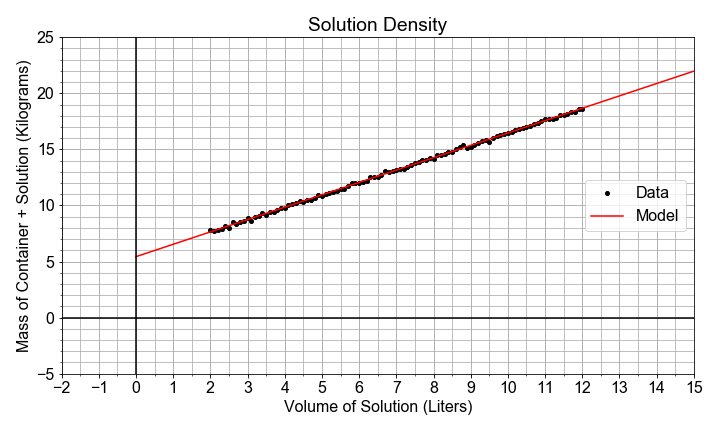
在這個練習中,你會在一個情境裡看到截距與斜率參數:我們要為一個大型玻璃壺中溶液的體積量測建立模型。這個溶液由水、穀物、糖與酵母組成。我們也記錄了溶液與玻璃容器的總質量,但沒有記下空容器的質量。
你的任務是使用預先載入的 pandas DataFrame df,其資料欄位為 volumes 與 masses,來建立一個線性模型,將 masses(y 資料)與 volumes(x 資料)關聯起來。斜率將用來估計此溶液的密度(質量變化/體積變化),而截距將用來估計空容器的重量(當 volume=0 時的質量)。
本練習屬於課程
Python 線性建模入門
練習說明
- 從
statsmodels匯入ols(),並使用它以data=df、formula = "masses ~ volumes"來建立並擬合模型。 - 分別用
.params['Intercept']與.params['volumes']取出截距a0與斜率a1。 - 以具物理意義的名稱列印
a0與a1。 - 列印
model_fit()並尋找與上面相符的數值;查看列標籤Intercept、volumes,以及欄標籤coef。
動手互動練習
試著完成這個範例程式碼,體驗一下這個練習。
# Import ols from statsmodels, and fit a model to the data
from statsmodels.formula.api import ols
model_fit = ols(formula="____ ~ ____", data=____)
model_fit = model_fit.fit()

# Extract the model parameter values, and assign them to a0, a1
a0 = model_fit.params['____']
a1 = model_fit.params['____']

# Print model parameter values with meaningful names, and compare to summary()
print( "container_mass   = {:0.4f}".format(____) )
print( "solution_density = {:0.4f}".format(____) )
print( model_fit.summary() )