统计骰子图像中的点数
现在我们已经找到了轮廓,就可以从中提取信息了。
在上一个练习中,您处理了一张紫色骰子的图像以找到其轮廓:
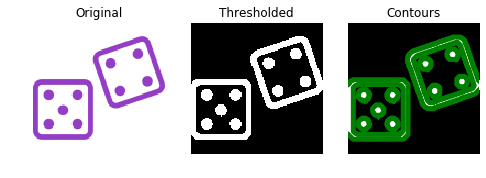
这一次,我们将通过统计图像中的点数来确定骰子掷出了哪个点数。
上一个练习中找到的轮廓已作为 contours 预加载。
请创建一个包含所有轮廓形状的列表 shape_contours。创建完成后,您可以在控制台中调用 shape_contours 来查看所有轮廓的形状。
请检查大多数轮廓的大小不超过 50。若您对它们计数,正好就是图像中的点数。
show_image_contour(image, contours) 是一个预加载函数,用于使用 Matplotlib 显示带有所有已找到轮廓的图像。
本练习是课程的一部分
Python 图像处理
练习说明
- 将
shape_contours设为包含contours所有轮廓形状的列表。 - 将
max_dots_shape设为 50。 - 将轮廓的形状条件设为点的最大形状大小
max_dots_shape。 - 打印骰子的点数。
交互式实操练习
通过完成这段示例代码来试试这个练习。
# Create list with the shape of each contour
shape_contours = [cnt.shape[0] for cnt in ____]

# Set 50 as the maximum size of the dots shape
max_dots_shape = ____

# Count dots in contours excluding bigger than dots size
dots_contours = [cnt for cnt in contours if np.shape(cnt)[0] < ____]

# Shows all contours found
show_image_contour(binary, contours)

# Print the dice's number
print("Dice's dots number: {}. ".format(len(____)))