帮 Sally 修复她的毕业照
现在请将您在本课程中学到的所有知识组合起来,完成最终挑战:重建一张受损严重的照片。
帮助 Sally 修复她最喜欢的肖像照。该照片由于笔记本电脑故障而出现噪声、畸变,并且有信息缺失。
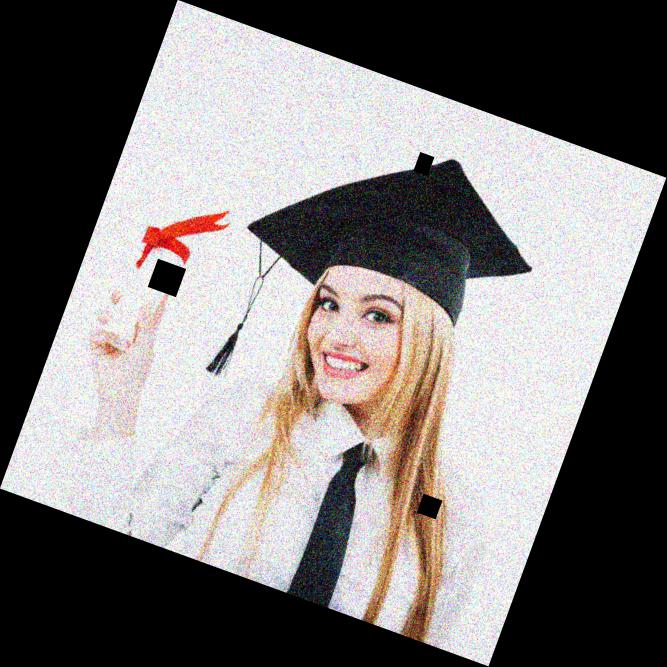
damaged_image。您将通过以下步骤修复这张图像:
- 使用
rotate()将其旋正 - 使用
denoise_tv_chambolle()进行降噪 - 使用
inpaint模块中的inpaint_biharmonic()重建受损区域。
show_image() 已预先加载。
本练习是课程的一部分
Python 图像处理
练习说明
- 导入用于图像修复的必要模块。
- 调用函数
rotate()将图像旋转到正确方向。 - 使用 Chambolle 算法去除图像噪声。
- 使用提供的掩码,采用 biharmonic 方法修复图像缺失区域,得到最终图像。
交互式实操练习
通过完成这段示例代码来试试这个练习。
# Import the necessary modules
from skimage.restoration import denoise_tv_chambolle, ____
from skimage import transform

# Transform the image so it's not rotated
upright_img = ____(damaged_image, 20)

# Remove noise from the image, using the chambolle method
upright_img_without_noise = ____(upright_img,weight=0.1, multichannel=True)

# Reconstruct the image missing parts
mask = get_mask(upright_img)
result = ____.____(upright_img_without_noise, mask, multichannel=True)

show_image(result)