過濾式與包裝式方法
在機器學習面試中,關於如何降低資料集維度的問題非常常見。降低維度的一種方式,是只選擇資料集中與任務相關的特徵。
在這裡你會先在 diabetes DataFrame 上練習一種過濾式(filter)方法,接著實作 2 種包含交叉驗證的包裝式(wrapper)方法。你將使用 pandas、matplotlib.pyplot 和 seaborn 來視覺化相關性、處理資料,並將特徵選取技巧套用到你的資料集上。
已將移除目標變數欄位(progression)後的特徵矩陣載入為 X,而目標變數載入為 y。
另外,pandas、matplotlib.pyplot 與 seaborn 已經分別以 pd、plt、sns 匯入到你的工作環境中。
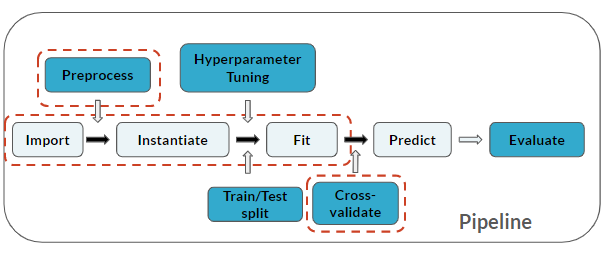
注意你已在流程中加入了一個「Cross-validate」步驟(適用於最後 3 個步驟):
本練習屬於課程
用 Python 練習機器學習面試題
動手互動練習
試著完成這個範例程式碼,體驗一下這個練習。
# Create correlation matrix and print it
cor = ____.____()
print(____)

# Correlation matrix heatmap
plt.figure()
sns.____(____, annot=True, cmap=plt.cm.Reds)
plt.show()

# Correlation with output variable
cor_target = abs(cor["progression"])

# Selecting highly correlated features
best_features = ____[____ > ____]
print(____)