當背景不那麼明顯時
有時候要辨識背景並不那麼直覺。如果影像的背景相當一致,你可以像之前練習的一樣,使用 threshold_otsu() 做全域閾值。 不過,如果背景亮度不均,使用自適應閾值 threshold_local()(也就是區域閾值)通常能得到更好的結果。
在這個練習中,你會比較這兩種閾值方法(全域與區域),找出最適合產生所需二值化影像的做法。
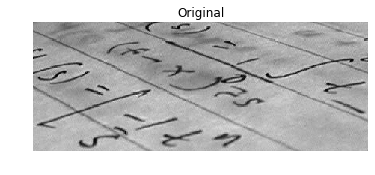
影像已載入為
page_image。
本練習屬於課程
Python 影像處理
動手互動練習
試著完成這個範例程式碼,體驗一下這個練習。
# Import the otsu threshold function
from skimage.____ import ____

# Obtain the optimal otsu global thresh value
global_thresh = ____(page_image)

# Obtain the binary image by applying global thresholding
binary_global = page_image ____ ____

# Show the binary image obtained
show_image(binary_global, 'Global thresholding')