幫 Sally 修復她的畢業照
你將把整門課所學整合起來,挑戰最後任務:修復一張受損嚴重的照片。
請幫 Sally 修復她最喜愛的人像照。這張照片因為筆電遭入侵而受到雜訊、扭曲與遺失資訊的破壞。
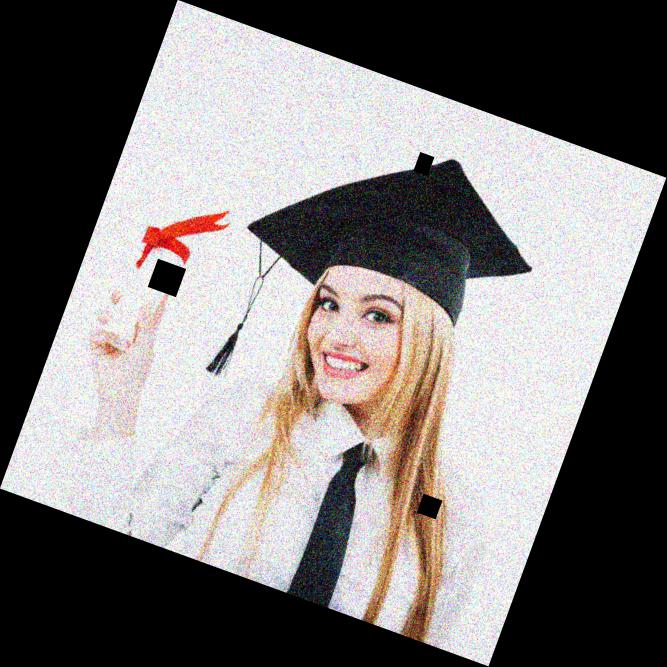
damaged_image。你會透過以下步驟修正這張影像的問題:
- 使用
rotate()將影像旋正 - 使用
denoise_tv_chambolle()進行雜訊消除 - 使用
inpaint模組中的inpaint_biharmonic()重建受損區域。
show_image() 已預先載入。
本練習屬於課程
Python 影像處理
練習說明
- 匯入進行影像修復所需的模組。
- 呼叫
rotate()函式將影像旋轉。 - 使用 Chambolle 演算法移除影像雜訊。
- 使用提供的遮罩,套用 biharmonic 方法修復遺失區域,得到最終影像。
動手互動練習
試著完成這個範例程式碼,體驗一下這個練習。
# Import the necessary modules
from skimage.restoration import denoise_tv_chambolle, ____
from skimage import transform

# Transform the image so it's not rotated
upright_img = ____(damaged_image, 20)

# Remove noise from the image, using the chambolle method
upright_img_without_noise = ____(upright_img,weight=0.1, multichannel=True)

# Reconstruct the image missing parts
mask = get_mask(upright_img)
result = ____.____(upright_img_without_noise, mask, multichannel=True)

show_image(result)