การแก้ไขภาพแบบกำหนดเอง
การสร้างภาพด้วย AI นั้นน่าทึ่งอยู่แล้ว แต่บางโมเดลยังรองรับการแก้ไขภาพแบบกำหนดเอง ซึ่งเป็นรูปแบบ multi-modal ที่รับทั้ง text prompt และภาพต้นฉบับเป็น input ลองแก้ไขภาพเหมือนตนเองอันโด่งดังของ Van Gogh ให้กลายเป็นตัวการ์ตูน Snoopy โดยใช้ StableDiffusionControlNetPipeline:
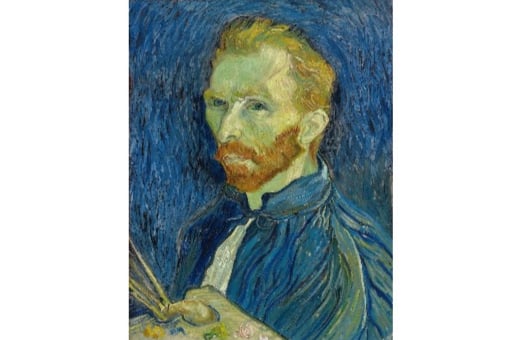
หมายเหตุ: การ Inference บน diffusion model อาจใช้เวลานาน เราจึงโหลดภาพที่สร้างไว้ล่วงหน้าให้แล้ว การใส่ prompt ต่างกันจะไม่สร้างภาพใหม่
ภาพที่ผ่านฟิลเตอร์ Canny ถูกสร้างไว้ให้แล้ว (canny_image) คลาส StableDiffusionControlNetPipeline และ ControlNetModel ถูก import จากไลบรารี diffusers มาแล้ว และ generator list (generator) ก็ถูกสร้างไว้ให้แล้วเช่นกัน
แบบฝึกหัดนี้เป็นส่วนหนึ่งของหลักสูตร
โมเดล Multi-Modal ด้วย Hugging Face
คำแนะนำการฝึกหัด
- โหลด
ControlNetModelจาก checkpointlllyasviel/sd-controlnet-canny - โหลด
StableDiffusionControlNetPipelineจาก checkpointrunwayml/stable-diffusion-v1-5โดยส่งcontrolnetที่เตรียมไว้ - รัน pipeline โดยใช้
prompt,canny_imageและnegative_promptกับgeneratorที่เตรียมไว้
แบบฝึกหัดเชิงโต้ตอบแบบลงมือทำ
ลองทำแบบฝึกหัดนี้โดยเติมโค้ดตัวอย่างนี้ให้สมบูรณ์
## NOTE: no imports are required for this exercise
# Load a ControlNetModel from the pretrained checkpoint
controlnet = ____("____", torch_dtype=torch.float16)

# Load a pretrained StableDiffusionControlNetPipeline using the ControlNetModel
pipe = ____(
    "____", controlnet=____, torch_dtype=torch.float16
)
pipe = pipe.to("cuda")

prompt = ["Snoopy, best quality, extremely detailed"]

# Run the pipeline
output = pipe(
    ____,
    ____,
    negative_prompt=["monochrome, lowres, bad anatomy, worst quality, low quality"],
    generator=____,
    num_inference_steps=20,
)

plt.imshow(output.images[0])
plt.show()