Plotar outras visualizações
Qualquer par de dimensões de um array pode formar uma imagem, e fatiar ao longo de eixos diferentes pode oferecer uma perspectiva útil. No entanto, taxas de amostragem desiguais podem criar imagens distorcidas.
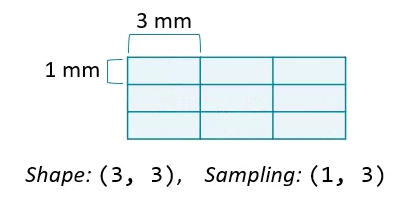
Alterar a proporção de aspecto pode resolver isso, aumentando a largura de uma das dimensões.
Neste exercício, plote imagens que fatiem ao longo da segunda e da terceira dimensões de vol. Defina explicitamente a proporção de aspecto para gerar imagens sem distorção.
Este exercicio faz parte do curso
Análise de Imagens Biomédicas em Python
Instruções do exercicio
- Fatie um plano 2D de
volonde o "eixo 1" é256. - Fatie um plano 2D de
volonde o "eixo 2" é256. - Para cada imagem, calcule a proporção de aspecto dividindo a taxa de "amostragem" da imagem para o eixo 0 pela do eixo oposto. Essa informação está em
vol.meta. - Plote as imagens em uma grade de subplots. Especifique o parâmetro
aspectpara cada imagem e definacmap='gray'.
exercicio interativo prático
Tente este exercicio completando este código de exemplo.
# Select frame from "vol"
im1 = vol[:, 256, :]
im2 = ____

# Compute aspect ratios
d0, d1, d2 = ____
asp1 = d0 / d2
asp2 = ____

# Plot the images on a subplots array
fig, axes = plt.subplots(nrows=2, ncols=1)
axes[0].imshow(im1, cmap='gray', ____)
____
plt.show()