Maak een masker
Maskers zijn de belangrijkste methode om specifieke delen van een afbeelding te verwijderen of te selecteren. Het zijn binaire arrays die aangeven of een waarde moet worden meegenomen in een analyse. Meestal maak je maskers door één of meer logische bewerkingen op een afbeelding toe te passen.
Gebruik in deze oefening een eenvoudige intensiteitsdrempel om huid en bot in de röntgenfoto van de hand te onderscheiden. (im is geëgaliseerd zodat het hele intensiteitsbereik wordt benut.)
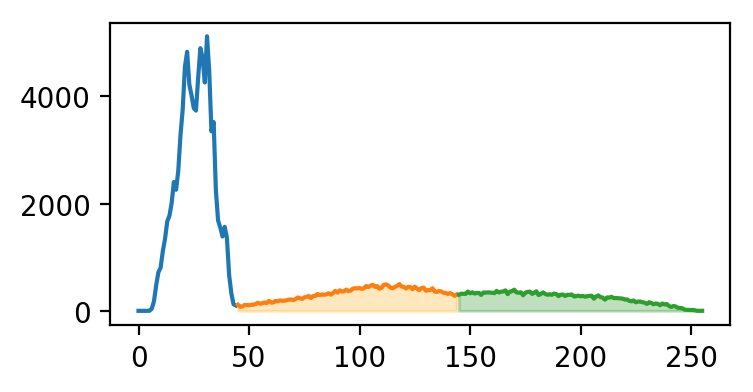
Hieronder zie je het histogram van im, ingekleurd volgens de segmenten die we gaan plotten.
Deze oefening maakt deel uit van de cursus
Biomedische beeldanalyse met Python
Oefeninstructies
- Maak een botmasker door pixels te selecteren met intensiteiten groter dan of gelijk aan
145. - Maak een huidmasker door pixels te selecteren met intensiteiten groter dan of gelijk aan
45en kleiner dan145. - Plot de huid- en botmaskers in grijswaarden.
Interactieve oefening met praktijkervaring
Probeer deze oefening door deze voorbeeldcode aan te vullen.
# Create skin and bone masks
mask_bone = ____
mask_skin = ____

# Plot the skin (0) and bone (1) masks
fig, axes = plt.subplots(1,2)
axes[0].imshow(____)
axes[1].imshow(____)
format_and_render_plot()