ファセットグリッドプロットを作成する
前の演習で、次のコードを書きました。
# Subset tech and fmcg companies
subset_dat = dataset.loc[dataset["comp_type"].isin(["tech", "fmcg"])]

# Compute yearly average gross margin ratio of tech and fmcg companies
subset_dat_avg = subset_dat.pivot_table(index=["Year", "comp_type"], values = "gross_margin").reset_index()

#Add column company
subset_dat_avg["company"] = np.where(subset_dat_avg["comp_type"]=="tech", "Avg tech", "Avg fmcg")

#Concat the DataFrames
plot_df = pd.concat([subset_dat, subset_dat_avg], axis=0)
このコードは、次のプロットを作成するためのデータ準備を行いました。
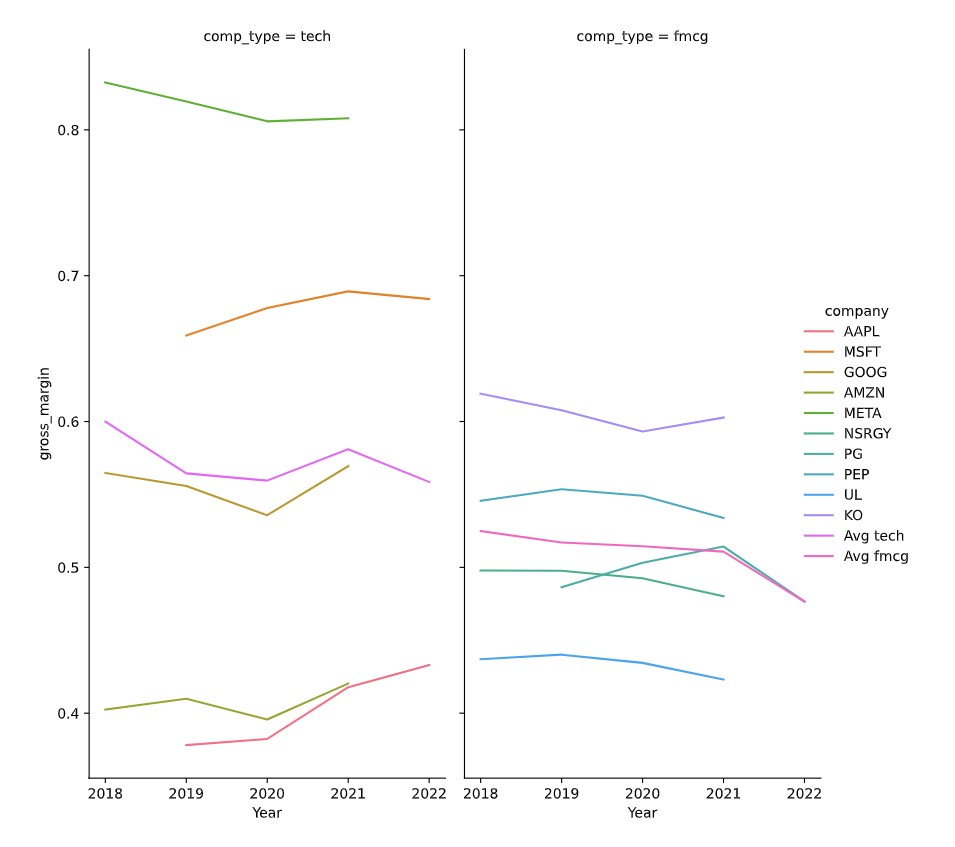
それでは、実際にプロットを作成しましょう。
この演習はコースの一部です
Pythonで学ぶ財務諸表分析
演習の手順
- DataFrame
plot_dfを使い、説明にあるファセットグリッドのプロットをseabornで作成してください。
実践的なインタラクティブ演習
このサンプルコードを完成させて、この演習に挑戦してみましょう。
# Make the plot
sns.relplot(data=plot_df.reset_index(drop=True), ____)
plt.show()
plt.close()