Crea una maschera
Le maschere sono il metodo principale per rimuovere o selezionare parti specifiche di un'immagine. Sono array binari che indicano se un valore deve essere incluso in un'analisi. In genere, le maschere si creano applicando una o più operazioni logiche a un'immagine.
In questo esercizio, prova a usare una semplice soglia di intensità per distinguere pelle e ossa nella radiografia della mano. (im è stata equalizzata per sfruttare l'intero intervallo di intensità.)
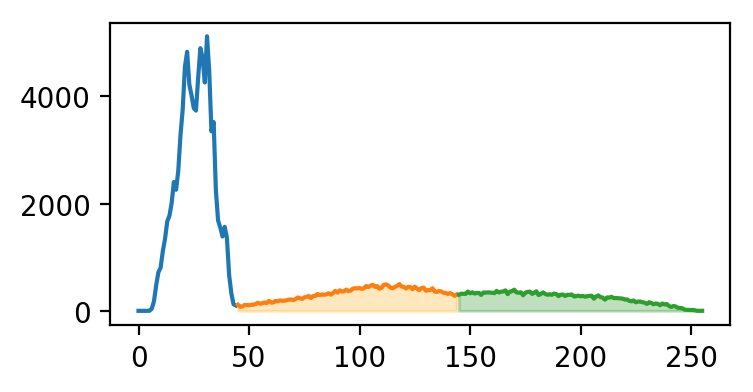
Di seguito trovi l'istogramma di im, colorato in base ai segmenti che mostreremo nel grafico.
Questo esercizio fa parte del corso
Analisi di immagini biomediche in Python
Istruzioni dell'esercizio
- Crea una maschera per l'osso selezionando i pixel con intensità maggiore o uguale a
145. - Crea una maschera per la pelle selezionando i pixel con intensità maggiore o uguale a
45e minore di145. - Rappresenta le maschere di pelle e osso in scala di grigi.
esercizio interattivo pratico
Prova questo esercizio completando questo codice di esempio.
# Create skin and bone masks
mask_bone = ____
mask_skin = ____

# Plot the skin (0) and bone (1) masks
fig, axes = plt.subplots(1,2)
axes[0].imshow(____)
axes[1].imshow(____)
format_and_render_plot()