上傳新的索引
Sam 幾乎完成了!在上一個練習中,她產生了一個新的目錄清單,並存進變數 objects_df:
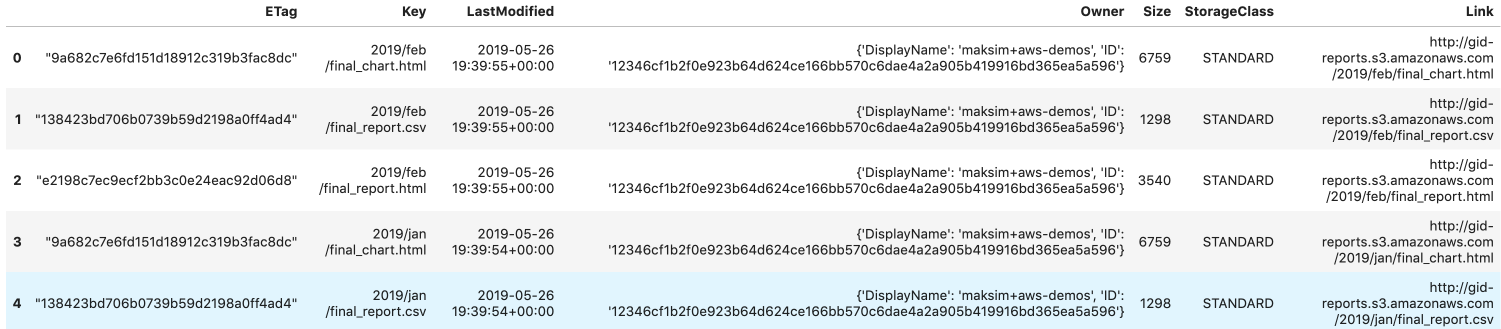
Sam 已在變數 s3 建立了 boto3 的 S3 用戶端。objects_df 已填入上一個練習產生的最新目錄清單。
下一步是把 objects_df 寫成 HTML 檔,並上傳到 S3,取代目前的 'index.html' 檔案。
幫 Sam 更新目錄清單,讓大眾不只可以存取 1 月的報表,也能存取 2 月的報表!
本練習屬於課程
Python 中的 AWS Boto 入門
練習說明
- 將
objects_df以可點擊連結的方式寫入 HTML 檔'report_listing.html'。 - HTML 檔只應包含
'Link'、'LastModified'和'Size'欄位。 - 上傳新版本檔案到 S3,覆寫
'index.html'。
動手互動練習
試著完成這個範例程式碼,體驗一下這個練習。
# Write objects_df to an HTML file
objects_df.____('report_listing.html',
    # Set clickable links
    ____=True,
	# Isolate the columns
    ____=['____', '____', '____'])

# Overwrite index.html key by uploading the new file
s3.upload_file(
  Filename='./report_listing.html', Key='____',
  Bucket='gid-reports',
  ____ = {
    'ContentType': '____',
    'ACL': 'public-read'
  })