Maske oluştur
Maskeler, bir görüntünün belirli kısımlarını kaldırmanın veya seçmenin başlıca yoludur. Analize dahil edilip edilmeyeceğini belirten ikili (binary) dizilerdir. Genellikle, bir veya daha fazla mantıksal işlemi görüntüye uygulayarak oluşturulurlar.
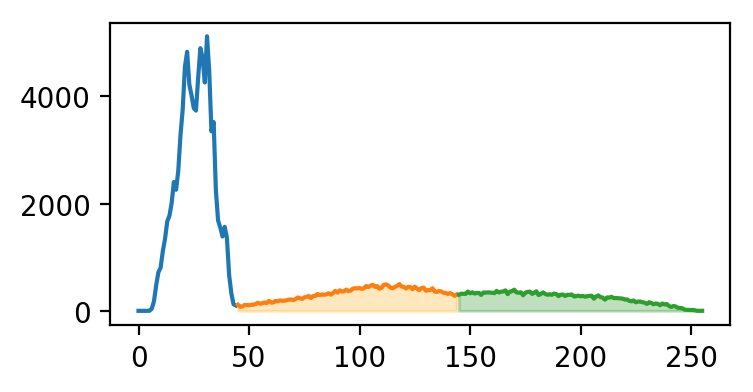
Bu egzersizde, el röntgeninde deri ile kemiği ayırt etmek için basit bir yoğunluk eşiği kullanmaya çalış. (im, tüm yoğunluk aralığını kullanacak şekilde eşitlenmiştir.)
Aşağıda, çizeceğimiz segmentlere göre renklendirilmiş im'in histogramı yer alıyor.
Bu egzersiz, kursun bir parçasıdır
Python ile Biyomedikal Görüntü Analizi
Egzersiz talimatları
- Yoğunluğu
145'e büyük veya eşit olan pikselleri seçerek bir kemik maskesi oluştur. - Yoğunluğu
45'e büyük veya eşit ve145'ten küçük olan pikselleri seçerek bir deri maskesi oluştur. - Deri ve kemik maskelerini gri tonlamalı olarak görselleştir.
Uygulamalı etkileşimli egzersiz
Bu egzersizi bu örnek kodu tamamlayarak deneyin.
# Create skin and bone masks
mask_bone = ____
mask_skin = ____

# Plot the skin (0) and bone (1) masks
fig, axes = plt.subplots(1,2)
axes[0].imshow(____)
axes[1].imshow(____)
format_and_render_plot()