Criando uma paleta contínua personalizada
Você está interessado nos níveis de poluição de Cincinnati no ano de 2014. Especificamente, você quer analisar CO e NO2, então cria um diagrama de dispersão simples para mostrar a relação entre esses dois poluentes.
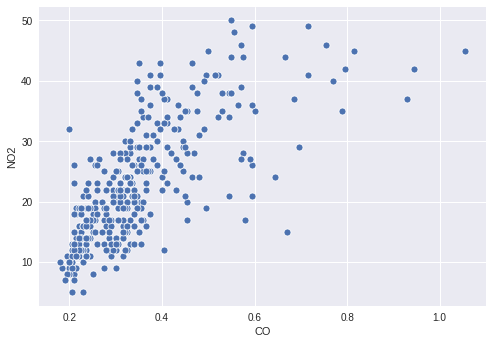
No entanto, pode haver informações interessantes em como o valor de O3 se relaciona com os dois poluentes plotados, então você decide colorir os pontos pelos níveis de O3. Para isso, você precisa definir uma paleta contínua apropriada e mapear sua coluna O3 para ela no seu gráfico de dispersão.
Este exercicio faz parte do curso
Aprimorando suas visualizações de dados em Python
Instruções do exercicio
- Crie uma paleta que mapeie continuamente de branco até
'orangered'. - Mapeie a coluna com os valores de
O3para a cor dos pontos. - Passe a paleta criada para a função de plotagem.
exercicio interativo prático
Tente este exercicio completando este código de exemplo.
# Filter the data
cinci_2014 = pollution.query("city  ==  'Cincinnati' & year  ==  2014")

# Define a custom continuous color palette
color_palette = sns.____('orangered',
                         ____ = True)

# Plot mapping the color of the points with custom palette
sns.scatterplot(x = 'CO',
                y = 'NO2',
                ____ = 'O3',
                data = cinci_2014,
                palette = ____)
plt.show()