データを定数として定義する
このコース全体で tensorflow バージョン 2.6.0 を使用し、各演習に必要なサブモジュールだけをインポートします。通常はすでに用意されていますが、この演習ではあなた自身で tensorflow から constant をインポートします。
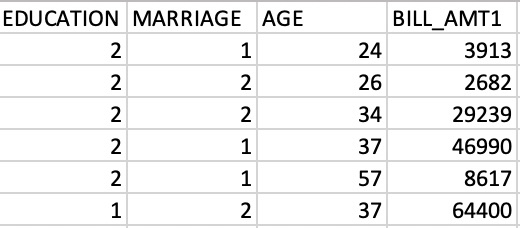
constant をインポートしたら、numpy 配列である credit_numpy を tensorflow の定数 credit_constant に変換します。この配列には、クレジットカード保有者のデータセットから抽出した特徴量の列が含まれており、下の画像でプレビューしています。このデータセットには後の章で再び取り組みます。
tensorflow 2 では、データを numpy 配列としても、tensorflow の constant オブジェクトとしても扱えます。constant を使うと、そのオブジェクトに対して行う演算はすべて tensorflow 上で実行されます。
この演習はコースの一部です
Introduction to TensorFlow in Python
演習の手順
tensorflowモジュールからサブモジュールconstantをインポートします。credit_numpy配列をtensorflowのconstantオブジェクトに変換します。データ型は設定しないでください。
実践的なインタラクティブ演習
このサンプルコードを完成させて、この演習に挑戦してみましょう。
# Import constant from TensorFlow
from tensorflow import ____

# Convert the credit_numpy array into a tensorflow constant
credit_constant = constant(____)

# Print constant datatype
print('\n The datatype is:', credit_constant.dtype)

# Print constant shape
print('\n The shape is:', credit_constant.shape)