料理を探る:主要な材料
食は万国共通の関心ごとです。材料の組み合わせ次第で、作れる料理はほぼ無限に広がります!この演習では、レシピ名、そのレシピの料理(cuisine)、使用する材料を含む recipes データセットを使って、各料理でよく使われる材料を探索できる Shiny アプリを作成します。
最終的なアプリは、次のスクリーンショットの画像のようになります。
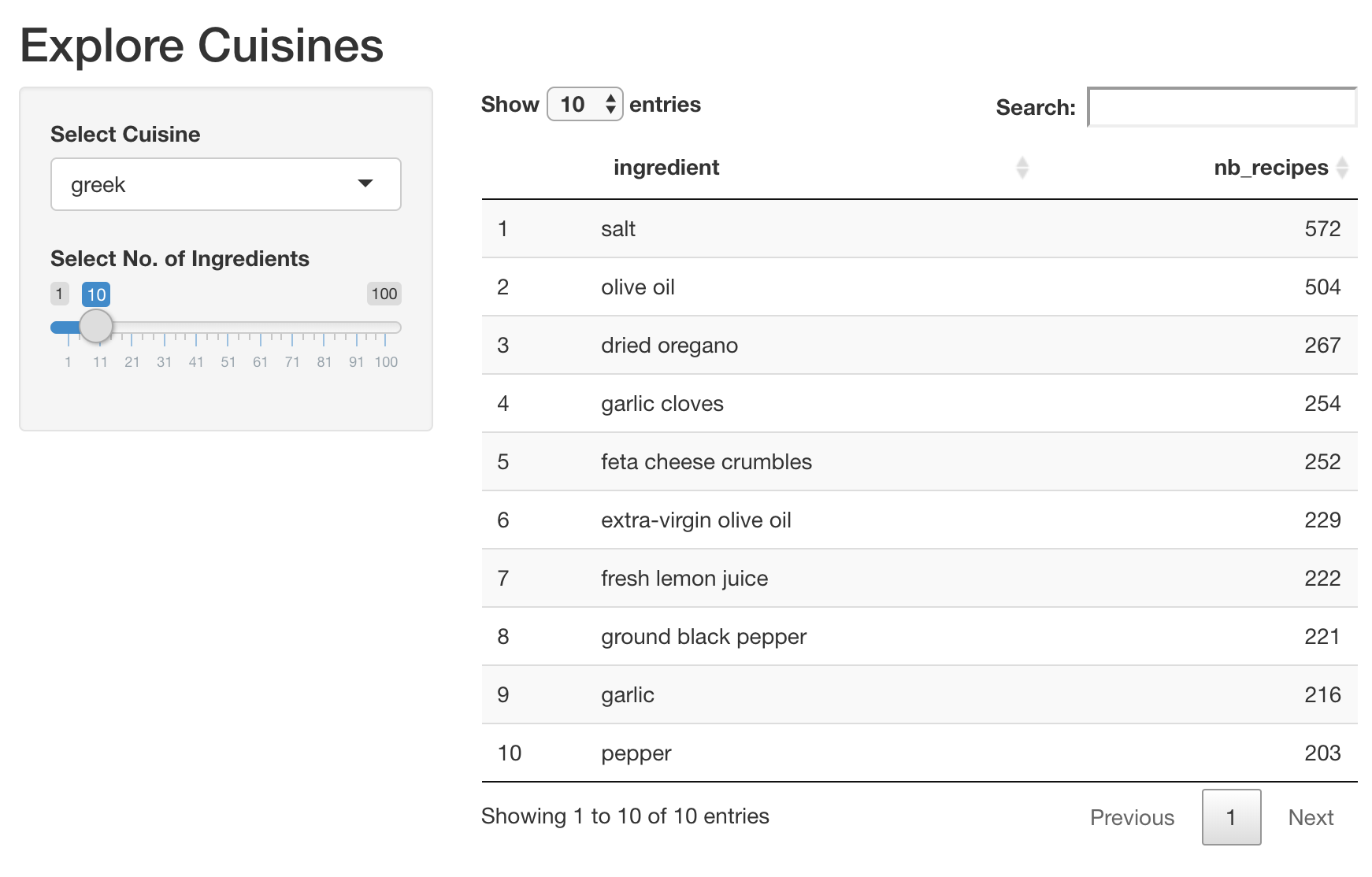
パッケージ shiny と dplyr、そしてデータセット recipes はすでに読み込まれています。さらに、ギリシャ料理でよく使われる上位10個の材料を取得する便利なコードスニペットを用意しました。ユーザーが選択した料理と表示する材料数に基づいて、アプリ内で対話的なデータテーブルを作成する際に役立ちます。
recipes %>%
  filter(cuisine == 'greek') %>%
  count(ingredient, name = 'nb_recipes') %>%
  arrange(desc(nb_recipes)) %>%
  head(10)
この演習はコースの一部です
Rで作るShiny Webアプリケーション
演習の手順
- UI:
- サイドバーに
cuisineという入力を追加し、recipesデータセットで利用可能なすべての料理から選べるようにします。 - サイドバーに
nb_ingredientsというスライダー入力を追加し、表示する材料の数を選べるようにします。 - メインパネルに
dt_top_ingredientsという名前の対話的データテーブル出力を追加します。
- サイドバーに
- Server:
- 選択された料理と、表示する上位の材料数に基づいて
recipesをフィルタします。 - フィルタ後のデータを対話的なデータテーブルとしてレンダリングします。
- それを
dt_top_ingredientsという名前の出力オブジェクトに割り当てます。
- 選択された料理と、表示する上位の材料数に基づいて
実践的なインタラクティブ演習
このサンプルコードを完成させて、この演習に挑戦してみましょう。
ui <- fluidPage(
  titlePanel('Explore Cuisines'),
  sidebarLayout(
    sidebarPanel(
      # CODE BELOW: Add an input named "cuisine" to select a cuisine

      # CODE BELOW: Add an input named "nb_ingredients" to select # of ingredients

    ),
    mainPanel(
      # CODE BELOW: Add a DT output named "dt_top_ingredients"

    )
  )
)

server <- function(input, output, session) {
  # CODE BELOW: Render the top ingredients in a chosen cuisine as
  # an interactive data table and assign it to output object `dt_top_ingredients`


}

shinyApp(ui, server)