Créer un masque
Les masques sont la méthode principale pour exclure ou sélectionner des parties spécifiques d'une image. Ce sont des tableaux binaires qui indiquent si une valeur doit être incluse dans une analyse. En général, on crée des masques en appliquant une ou plusieurs opérations logiques à une image.
Dans cet exercice, essayez d'utiliser un simple seuil d'intensité pour distinguer la peau de l'os sur la radiographie de la main. (im a été égalisée pour exploiter toute la plage d'intensité.)
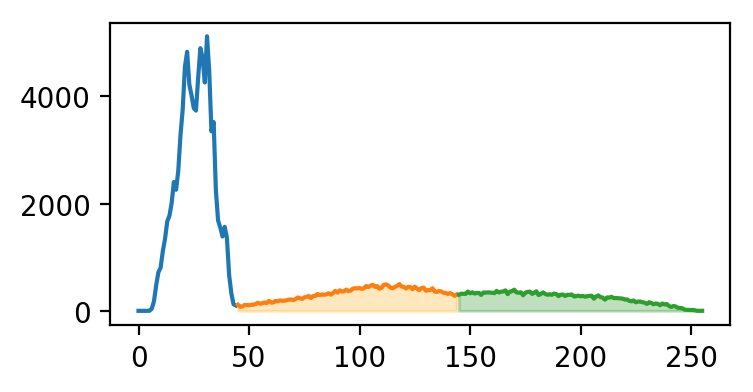
Ci-dessous se trouve l'histogramme de im, coloré selon les segments que nous allons tracer.
Cet exercice fait partie du cours
<cours>Analyse d'images biomédicales en Python</cours>Instructions de l’exercice
- Créez un masque pour l'os en sélectionnant les pixels dont l'intensité est supérieure ou égale à
145. - Créez un masque pour la peau en sélectionnant les pixels dont l'intensité est supérieure ou égale à
45et inférieure à145. - Tracez les masques de la peau et de l'os en niveaux de gris.
Exercice interactif pratique
Essayez cet exercice en complétant ce code d’exemple.
# Create skin and bone masks
mask_bone = ____
mask_skin = ____

# Plot the skin (0) and bone (1) masks
fig, axes = plt.subplots(1,2)
axes[0].imshow(____)
axes[1].imshow(____)
format_and_render_plot()