Empiler des images
Les « piles » d'images constituent une bonne métaphore pour comprendre les données multidimensionnelles. Chaque dimension supérieure correspond à une pile de tableaux de dimension inférieure.
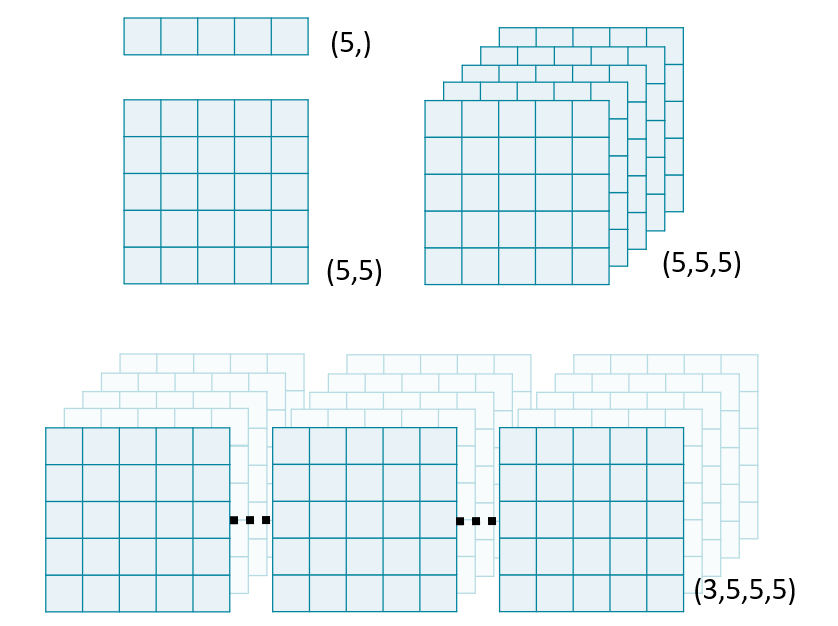
Dans cet exercice, nous allons utiliser la fonction stack() de NumPy pour combiner plusieurs tableaux 2D en un volume 3D. Par convention, les données volumétriques doivent être empilées le long de la première dimension : vol[plane, row, col].
Remarque : appliquer une opération sur un objet Image d'ImageIO le convertira en numpy.ndarray et supprimera ses métadonnées.
Cet exercice fait partie du cours
<cours>Analyse d'images biomédicales en Python</cours>Instructions de l’exercice
- Importez
imageioetnumpy(sous le nomnp). - Chargez « chest-220.dcm », « chest-221.dcm » et « chest-222.dcm ».
- Créez un volume 3D avec
np.stack(). Définissez le paramètreaxisd'empilement à 0. - Affichez l'attribut
shapedevol.
Exercice interactif pratique
Essayez cet exercice en complétant ce code d’exemple.
# Import ImageIO and NumPy
import imageio.v2 as imageio
import ____ as ____

# Read in each 2D image
im1 = imageio.imread('chest-220.dcm')
im2 = ____
im3 = ____

# Stack images into a volume
vol = np.stack(____)
print('Volume dimensions:', ____)