엣지 유형 추출하기
이 연습 문제에서는 고객 데이터프레임의 고객 ID를 고객 엣지 리스트와 매칭하여 각 엣지가 이탈(churn), 비이탈(non-churn), 또는 혼합(mixed) 엣지인지 확인해 보겠습니다.
match() 함수를 사용해 엣지 리스트에 두 개의 열을 추가해요.
from열의 이탈 상태를 담는fromLabelto열의 이탈 상태를 담는toLabel
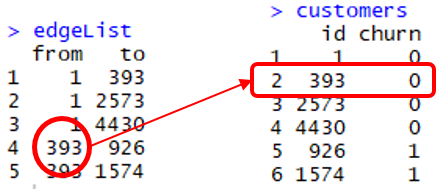
match(x, y) 명령은 y에서 x의 위치를 담은 벡터를 반환합니다. 위 그림에서 match(edgeList$from, customers$id)의 결과는 1,1,1,2,2입니다. 예를 들어, edgeList$from의 네 번째 값(고객 ID 393)은 customers$id의 두 번째 원소예요.
따라서 이 고객의 이탈 라벨은 customers[2,2], 즉 0입니다.
같은 방식으로 edgeList$from의 모든 고객의 이탈 라벨은 customers[match(edgeList$from, customers$id),2]가 됩니다.
이 연습은 강의의 일부입니다
R로 배우는 네트워크 데이터 기반 Predictive Analytics
연습 안내
customers$id를edgeList$from과 매칭하여customers$churn을 추출하고, 이를FromLabel이라는 열로edgeList데이터프레임에 추가하세요.to엣지에도 동일하게 적용하여ToLabel이라는 열을 추가하세요.FromLabel과ToLabel두 열의 합을 나타내는edgeType열을edgeList데이터프레임에 추가하세요.- 각 엣지 유형의 개수를 확인하기 위해
table()함수를 사용하세요.
실습형 인터랙티브 연습
이 예제를 이 샘플 코드를 완성하여 풀어보세요.
# Add the column edgeList$FromLabel
edgeList$FromLabel <- customers[match(edgeList$___, customers$___), 2]

# Add the column edgeList$ToLabel
edgeList$ToLabel <- customers[___(___, ___), 2]

# Add the column edgeList$edgeType
edgeList$edgeType <- edgeList$___ + edgeList$___

# Count the number of each type of edge
___(edgeList$edgeType)