Datum formatieren
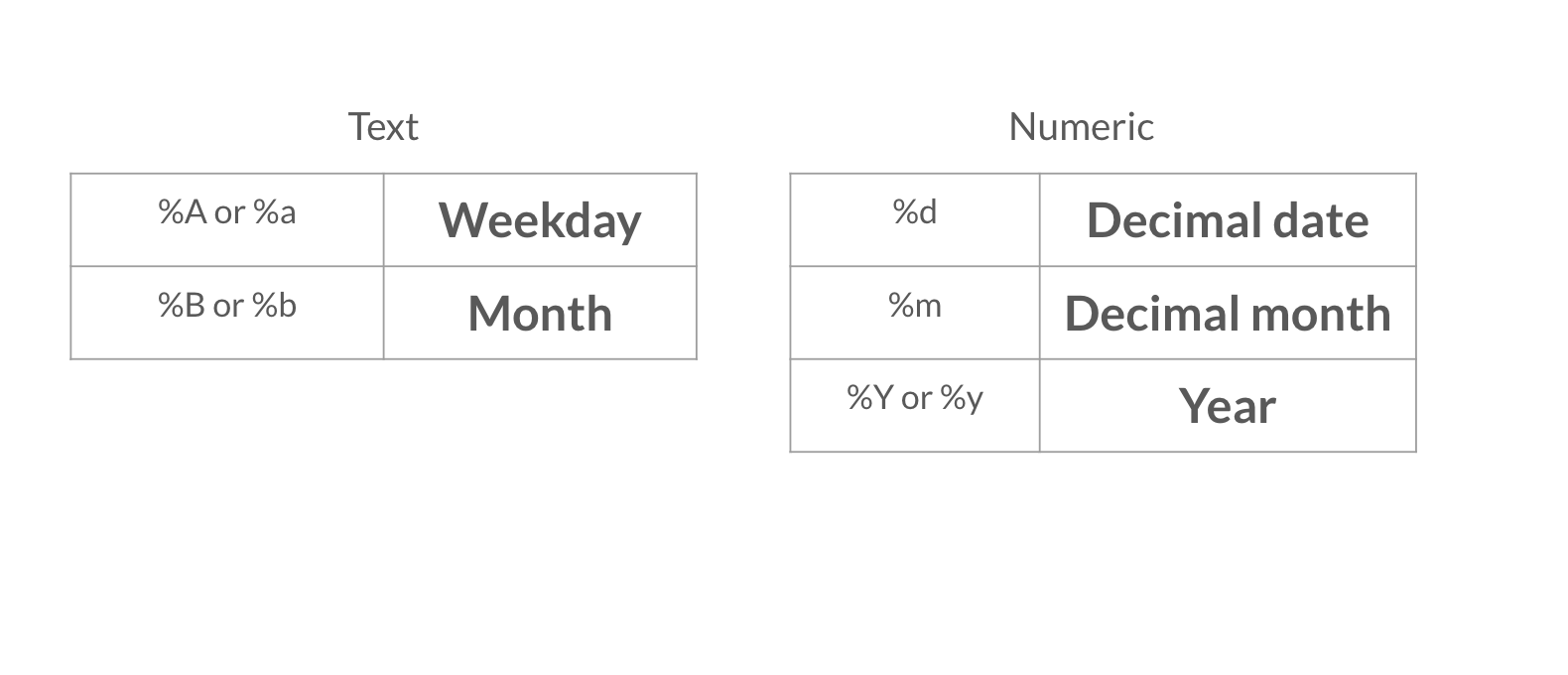
Nachdem dein Bericht jetzt einige übergeordnete Details enthält, möchtest du das Datum in einem anderen Format aufnehmen. Sieh dir dafür die Tabellen mit den Datumsformatierungsoptionen im folgenden Video an.
Diese Übung ist Teil des Kurses
<Kurs>Berichten mit R Markdown</Kurs>Übungsanweisungen
- Ändere das Datum im YAML-Header mit der Funktion
Sys.time()so, dass das Datum als Dezimaltag, vollständiger Monatsname und vierstellige Jahreszahl angezeigt wird, zum Beispiel: 08 April 2020.
Interaktive praktische Übung
Versuche dich an dieser Übung, indem du diesen Beispielcode vervollständigst.
{"investment_report.Rmd":"---\ntitle: \"Investment Report\"\nauthor: \"Add your name\"\ndate: \"`r format(___, '___')`\"\noutput: html_document\n---\n\n```{r data, include = FALSE}\nlibrary(readr)\n\ninvestment_annual_summary <- read_csv(\"https://assets.datacamp.com/production/repositories/5756/datasets/d0251f26117bbcf0ea96ac276555b9003f4f7372/investment_annual_summary.csv\")\ninvestment_services_projects <- read_csv(\"https://assets.datacamp.com/production/repositories/5756/datasets/78b002735b6f620df7f2767e63b76aaca317bf8d/investment_services_projects.csv\")\n```\n\n\n## Datasets \n\n### Investment Annual Summary\n\nThe `investment_annual_summary` dataset provides a summary of the dollars in millions provided to each region for each fiscal year, from 2012 to 2018.\n```{r}\ninvestment_annual_summary\n```\n\n### Investment Services Projects\n\nThe `investment_services_projects` dataset provides information about each investment project from the 2012 to 2018 fiscal years. Information listed includes the project name, company name, sector, project status, and investment amounts.\n```{r}\ninvestment_services_projects \n```\n\n\n"}