应用 1:多语言问候
恭喜!您现在已经可以开始构建自己的应用了。学习 Shiny 的最佳方式是将一个已有应用拆解,然后从零开始重建。
在本练习中,您将构建一个 Shiny 应用。它允许您输入姓名并选择问候语(Hello/Bonjour),当用户是 Kaelen 时,返回 "Hello, Kaelen"。当然,这是一个非常简单的应用,但挑战在于您需要从头开始编写代码!祝您好运!
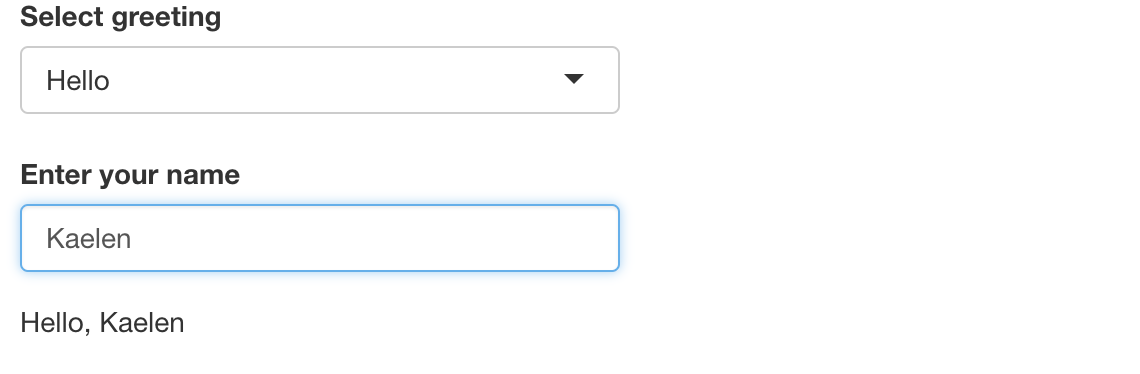
我们已经为您加载了 shiny 包。请回顾构建 Shiny 应用的 4 个步骤:(1)添加输入,(2)添加输出,(3)更新布局,(4)更新输出。
本练习是课程的一部分
使用 R 构建 Shiny Web 应用
练习说明
- 添加一个输入,用于在 "Hello" 和 "Bonjour" 两种问候类型之间进行选择。
- 添加一个文本输入,用于输入姓名。
- 如果选择的问候类型是 "Bonjour",且输入的姓名是 "Kaelen",您的应用应打印 "Bonjour, Kaelen"。
交互式实操练习
通过完成这段示例代码来试试这个练习。
ui <- fluidPage(

)

server <- function(input, output, session) {

}

shinyApp(ui = ui, server = server)