Criando uma lista com marcadores
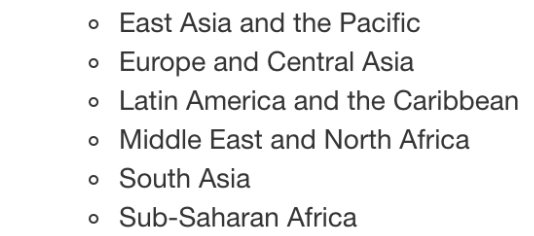
Antes, você aprendeu a adicionar texto ao seu arquivo Markdown para incluir informações extras para o seu público. Agora, você vai criar uma lista com marcadores para indicar quais regiões estão incluídas nos dados investment_annual_summary. Consulte a imagem abaixo, do vídeo, para relembrar a lista de regiões que devem aparecer na sua tabela.
Este exercicio faz parte do curso
Relatórios com R Markdown
Instruções do exercicio
- Adicione ao relatório, a partir da linha
27, uma lista com marcadores contendo cada uma das regiões incluídas nos dados: East Asia and the Pacific, Europe and Central Asia, Latin America and the Caribbean, Middle East and North Africa, South Asia e Sub-Saharan Africa.
exercicio interativo prático
Tente este exercicio completando este código de exemplo.
{"investment_report.Rmd":"---\ntitle: \"Investment Report\"\ndate: \"`r format(Sys.time(), '%d %B %Y')`\"\noutput: html_document\n---\n\n```{r setup, include = FALSE}\nknitr::opts_chunk$set(fig.align = 'center', echo = TRUE)\n```\n\n```{r data, include = FALSE}\nlibrary(readr)\nlibrary(dplyr)\nlibrary(ggplot2)\n\ninvestment_annual_summary <- read_csv(\"https://assets.datacamp.com/production/repositories/5756/datasets/d0251f26117bbcf0ea96ac276555b9003f4f7372/investment_annual_summary.csv\")\ninvestment_region_summary <- read_csv(\"https://assets.datacamp.com/production/repositories/5756/datasets/52f5414f6504e0503e86eb1043afa9b3d157fab2/investment_region_summary.csv\")\ninvestment_services_projects <- read_csv(\"https://assets.datacamp.com/production/repositories/5756/datasets/bcb2e39ecbe521f4b414a21e35f7b8b5c50aec64/investment_services_projects.csv\")\n```\n\n\n## Datasets \n### Investment Annual Summary\nThe `investment_annual_summary` dataset provides a summary of the dollars in millions provided to each of the following regions for each fiscal year, from 2012 to 2018:\n\n\n\n\n\n\n\n\n```{r investment-annual-summary, out.width = '85%', fig.cap = 'Figure 1.1 The Investment Annual Summary for each region for 2012 to 2018.'}\nggplot(investment_annual_summary, aes(x = fiscal_year, y = dollars_in_millions, color = region)) +\n geom_line() +\n labs(\n title = \"Investment Annual Summary\",\n x = \"Fiscal Year\",\n y = \"Dollars in Millions\"\n )\n```\n\n### Investment Projects in Brazil\nThe `investment_services_projects` dataset provides information about each investment project from 2012 to 2018. Information listed includes the project name, company name, sector, project status, and investment amounts.\n\n```{r brazil-investment-projects, out.width = '95%', fig.cap = 'Figure 1.2 The Investment Services Projects in Brazil from 2012 to 2018.'}\nbrazil_investment_projects <- investment_services_projects %>%\n filter(country == \"Brazil\") \n\nggplot(brazil_investment_projects, aes(x = date_disclosed, y = total_investment, color = status)) +\n geom_point() +\n labs(\n title = \"Investment Services Projects in Brazil\",\n x = \"Date Disclosed\",\n y = \"Total IFC Investment in Dollars in Millions\"\n )\n```\n\n### Investment Projects in Brazil in 2018\nThe `investment_services_projects` dataset was filtered below to focus on information about each investment project from the 2018 fiscal year, and is referred to as `brazil_investment_projects_2018`. \n\n```{r brazil-investment-projects-2018, out.width = '95%', fig.cap = 'Figure 1.3 The Investment Services Projects in Brazil in 2018.'}\nbrazil_investment_projects_2018 <- investment_services_projects %>%\n filter(country == \"Brazil\",\n date_disclosed >= \"2017-07-01\",\n date_disclosed <= \"2018-06-30\") \n\nggplot(brazil_investment_projects_2018, aes(x = date_disclosed, y = total_investment, color = status)) +\n geom_point() +\n labs(\n title = \"Investment Services Projects in Brazil in 2018\",\n x = \"Date Disclosed\",\n y = \"Total IFC Investment in Dollars in Millions\"\n ) \n```\n\n\n"}