Formatando a data
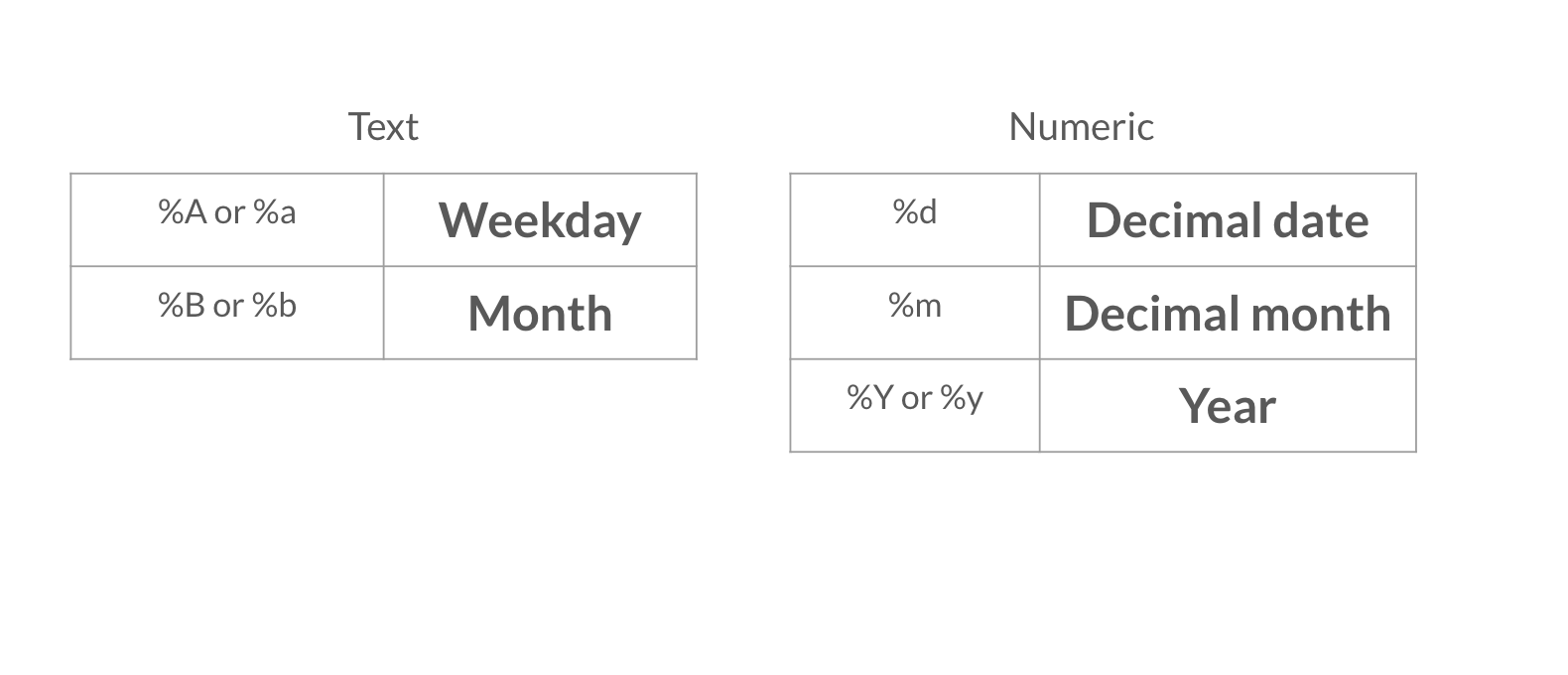
Agora que seu relatório inclui mais detalhes de alto nível, você quer incluir a data em um formato diferente. Não deixe de consultar as tabelas de opções de formatação de data do vídeo abaixo.
Este exercicio faz parte do curso
Relatórios com R Markdown
Instruções do exercicio
- Modifique a data no cabeçalho YAML usando a função
Sys.time()para que a data seja exibida como o dia em decimal, o nome completo do mês e o ano com quatro dígitos, por exemplo: 08 April 2020.
exercicio interativo prático
Tente este exercicio completando este código de exemplo.
{"investment_report.Rmd":"---\ntitle: \"Investment Report\"\nauthor: \"Add your name\"\ndate: \"`r format(___, '___')`\"\noutput: html_document\n---\n\n```{r data, include = FALSE}\nlibrary(readr)\n\ninvestment_annual_summary <- read_csv(\"https://assets.datacamp.com/production/repositories/5756/datasets/d0251f26117bbcf0ea96ac276555b9003f4f7372/investment_annual_summary.csv\")\ninvestment_services_projects <- read_csv(\"https://assets.datacamp.com/production/repositories/5756/datasets/78b002735b6f620df7f2767e63b76aaca317bf8d/investment_services_projects.csv\")\n```\n\n\n## Datasets \n\n### Investment Annual Summary\n\nThe `investment_annual_summary` dataset provides a summary of the dollars in millions provided to each region for each fiscal year, from 2012 to 2018.\n```{r}\ninvestment_annual_summary\n```\n\n### Investment Services Projects\n\nThe `investment_services_projects` dataset provides information about each investment project from the 2012 to 2018 fiscal years. Information listed includes the project name, company name, sector, project status, and investment amounts.\n```{r}\ninvestment_services_projects \n```\n\n\n"}