맞춤형 이미지 편집
AI 이미지 생성도 충분히 멋지지만, 일부 모델은 텍스트 프롬프트와 원본 이미지를 함께 입력받는 멀티모달 방식의 맞춤형 이미지 편집도 지원해요. StableDiffusionControlNetPipeline을 사용해 반 고흐의 유명한 자화상을 만화 캐릭터 Snoopy 버전으로 바꿔 보세요:
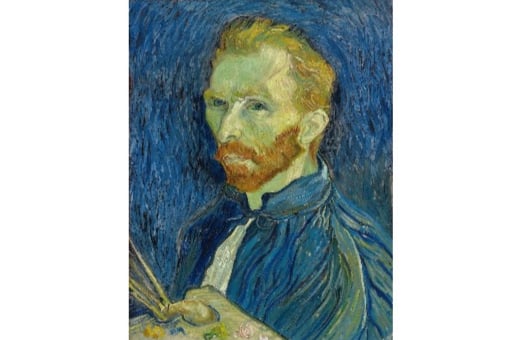
참고: 확산 모델 추론은 시간이 오래 걸릴 수 있어, 생성된 이미지를 미리 불러왔어요. 다른 프롬프트를 실행해도 새로운 이미지는 생성되지 않아요.
이 이미지의 Canny 필터 버전(canny_image)은 준비되어 있어요. diffusers 라이브러리에서 StableDiffusionControlNetPipeline과 ControlNetModel 클래스가 이미 임포트되어 있고, 생성기 리스트(generator)도 만들어져 있어요.
이 연습은 강의의 일부입니다
Hugging Face로 배우는 멀티모달 모델
연습 안내
lllyasviel/sd-controlnet-canny체크포인트에서ControlNetModel을 로드하세요.- 제공된
controlnet을 전달하여,runwayml/stable-diffusion-v1-5체크포인트에서StableDiffusionControlNetPipeline을 로드하세요. - 제공된
prompt,canny_image,negative_prompt,generator를 사용해 파이프라인을 실행하세요.
실습형 인터랙티브 연습
이 예제를 이 샘플 코드를 완성하여 풀어보세요.
## NOTE: no imports are required for this exercise
# Load a ControlNetModel from the pretrained checkpoint
controlnet = ____("____", torch_dtype=torch.float16)

# Load a pretrained StableDiffusionControlNetPipeline using the ControlNetModel
pipe = ____(
    "____", controlnet=____, torch_dtype=torch.float16
)
pipe = pipe.to("cuda")

prompt = ["Snoopy, best quality, extremely detailed"]

# Run the pipeline
output = pipe(
    ____,
    ____,
    negative_prompt=["monochrome, lowres, bad anatomy, worst quality, low quality"],
    generator=____,
    num_inference_steps=20,
)

plt.imshow(output.images[0])
plt.show()