Formattare la data
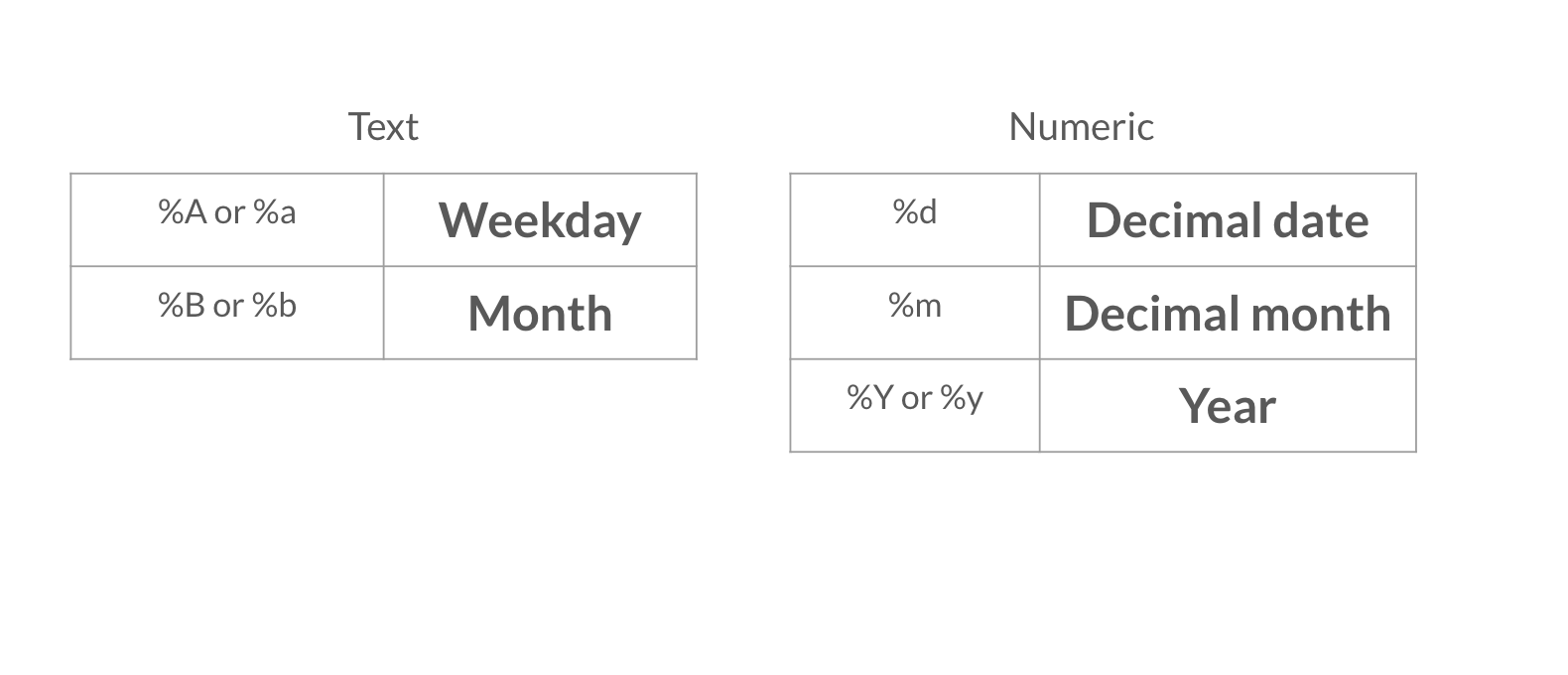
Ora che il tuo report include qualche dettaglio di alto livello in più, vuoi inserire la data con un formato diverso. Ricorda di consultare le tabelle delle opzioni di formattazione delle date nel video qui sotto.
Questo esercizio fa parte del corso
Reportistica con R Markdown
Istruzioni dell'esercizio
- Modifica la data nell'intestazione YAML usando la funzione
Sys.time()in modo che la data venga visualizzata come giorno in formato decimale, nome completo del mese e anno a quattro cifre, ad esempio: 08 April 2020.
esercizio interattivo pratico
Prova questo esercizio completando questo codice di esempio.
{"investment_report.Rmd":"---\ntitle: \"Investment Report\"\nauthor: \"Add your name\"\ndate: \"`r format(___, '___')`\"\noutput: html_document\n---\n\n```{r data, include = FALSE}\nlibrary(readr)\n\ninvestment_annual_summary <- read_csv(\"https://assets.datacamp.com/production/repositories/5756/datasets/d0251f26117bbcf0ea96ac276555b9003f4f7372/investment_annual_summary.csv\")\ninvestment_services_projects <- read_csv(\"https://assets.datacamp.com/production/repositories/5756/datasets/78b002735b6f620df7f2767e63b76aaca317bf8d/investment_services_projects.csv\")\n```\n\n\n## Datasets \n\n### Investment Annual Summary\n\nThe `investment_annual_summary` dataset provides a summary of the dollars in millions provided to each region for each fiscal year, from 2012 to 2018.\n```{r}\ninvestment_annual_summary\n```\n\n### Investment Services Projects\n\nThe `investment_services_projects` dataset provides information about each investment project from the 2012 to 2018 fiscal years. Information listed includes the project name, company name, sector, project status, and investment amounts.\n```{r}\ninvestment_services_projects \n```\n\n\n"}