นับจุดบนภาพลูกเต๋า
เมื่อหา contour ได้แล้ว ก็สามารถดึงข้อมูลจาก contour เหล่านั้นได้
ในแบบฝึกหัดก่อนหน้า เราได้เตรียมภาพลูกเต๋าสีม่วงเพื่อค้นหา contour:
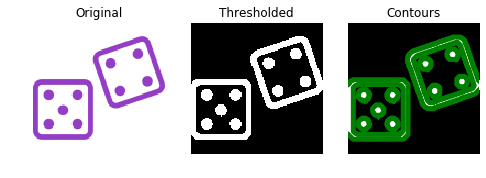
คราวนี้เราจะหาว่าลูกเต๋าออกหน้าอะไร โดยนับจำนวนจุดในภาพ
contour ที่ค้นพบในแบบฝึกหัดก่อนหน้าถูกโหลดไว้ล่วงหน้าในตัวแปร contours
สร้าง list ที่เก็บ shape ของ contour ทั้งหมดไว้ในตัวแปร shape_contours เมื่อสร้างแล้ว ลองเรียก shape_contours ใน console เพื่อดูค่า shape ของ contour ทั้งหมด
ตรวจสอบว่า contour ส่วนใหญ่มีขนาดไม่เกิน 50 หากนับ contour เหล่านี้ จะได้จำนวนที่ตรงกับจุดบนลูกเต๋าพอดี
show_image_contour(image, contours) คือฟังก์ชันที่โหลดไว้ล่วงหน้าสำหรับแสดงภาพพร้อม contour ทั้งหมดที่ค้นพบโดยใช้ Matplotlib
แบบฝึกหัดนี้เป็นส่วนหนึ่งของหลักสูตร
การประมวลผลภาพด้วย Python
คำแนะนำการฝึกหัด
- กำหนดให้
shape_contoursเป็น list ที่เก็บ shape ของ contour ทั้งหมดในcontours - กำหนด
max_dots_shapeเป็น 50 - ตั้งเงื่อนไข shape ของ contour ให้ใช้ขนาด shape สูงสุดของจุด
max_dots_shape - พิมพ์ตัวเลขบนลูกเต๋า
แบบฝึกหัดเชิงโต้ตอบแบบลงมือทำ
ลองทำแบบฝึกหัดนี้โดยเติมโค้ดตัวอย่างนี้ให้สมบูรณ์
# Create list with the shape of each contour
shape_contours = [cnt.shape[0] for cnt in ____]

# Set 50 as the maximum size of the dots shape
max_dots_shape = ____

# Count dots in contours excluding bigger than dots size
dots_contours = [cnt for cnt in contours if np.shape(cnt)[0] < ____]

# Shows all contours found
show_image_contour(binary, contours)

# Print the dice's number
print("Dice's dots number: {}. ".format(len(____)))