Plotando o modelo nos dados
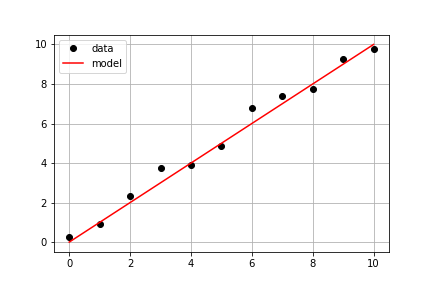
Continuando com os mesmos dados medidos do exercício anterior, seu objetivo é usar a model() predefinida e os dados medidos times e measured_distances para calcular as distâncias modeladas e, em seguida, plotar os dados medidos e modelados no mesmo eixo.
Este exercicio faz parte do curso
Introdução à Modelagem Linear em Python
Instruções do exercicio
- Use
model_distances = model(times, measured_distances)para calcular os valores modelados. - Use
plt.subplots()para criar os objetos de figura e eixo. - Use
axis.plot()para plotartimesvsmeasured_distancescom as opçõeslinestyle=" ", marker="o", color="black". - Use
axis.plot()para também plotartimesvsmodel_distancescom as opçõeslinestyle="-", color="red".
exercicio interativo prático
Tente este exercicio completando este código de exemplo.
# Pass times and measured distances into model
model_distances = model(____, ____)

# Create figure and axis objects and call axis.plot() twice to plot data and model distances versus times
fig, axis = plt.subplots()
axis.plot(____, ____, linestyle="____", marker="____", color="____", label="Measured")
axis.plot(____, ____, linestyle="____", marker=None, color="____", label="Modeled")

# Add grid lines and a legend to your plot, and then show to display
axis.grid(True)
axis.legend(loc="best")
plt.show()