Menghapus logo
Seperti yang kita lihat dalam video, kegunaan lain dari pemulihan citra adalah menghapus objek dari sebuah adegan. Pada latihan ini, kita akan menghapus logo Datacamp dari sebuah gambar.
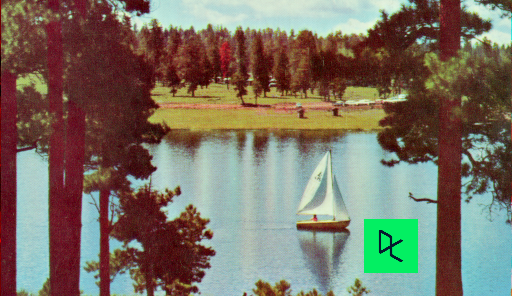
Citra dimuat sebagai
image_with_logo.
Anda akan membuat dan mengatur mask agar dapat menghapus logo dengan melakukan inpainting pada area ini.
Ingat bahwa ketika Anda ingin menghapus sebuah objek dari citra, Anda dapat menggambar batas objek tersebut secara manual atau menjalankan algoritma analisis citra untuk menemukannya.
Latihan ini merupakan bagian dari kursus
Pemrosesan Citra dengan Python
Instruksi latihan
- Inisialisasi sebuah mask dengan bentuk (shape) yang sama seperti citra, menggunakan
np.zeros(). - Pada mask, atur wilayah yang akan di-inpaint menjadi 1.
- Terapkan inpainting pada
image_with_logomenggunakanmask.
Latihan interaktif langsung praktik
Cobalah latihan ini dengan melengkapi kode contoh ini.
# Initialize the mask
mask = ____(____[:-1])

# Set the pixels where the logo is to 1
mask[210:290, 360:425] = ____

# Apply inpainting to remove the logo
image_logo_removed = inpaint.____(____,
                                  ____,
                                  multichannel=True)

# Show the original and logo removed images
show_image(image_with_logo, 'Image with logo')
show_image(image_logo_removed, 'Image with logo removed')