Bantu Sally memulihkan foto kelulusannya
Anda akan menggabungkan semua pengetahuan yang Anda peroleh sepanjang kursus untuk menyelesaikan tantangan akhir: merekonstruksi foto yang sangat rusak.
Bantu Sally memulihkan potret favoritnya yang rusak karena derau, distorsi, dan informasi yang hilang akibat kerusakan pada laptopnya.
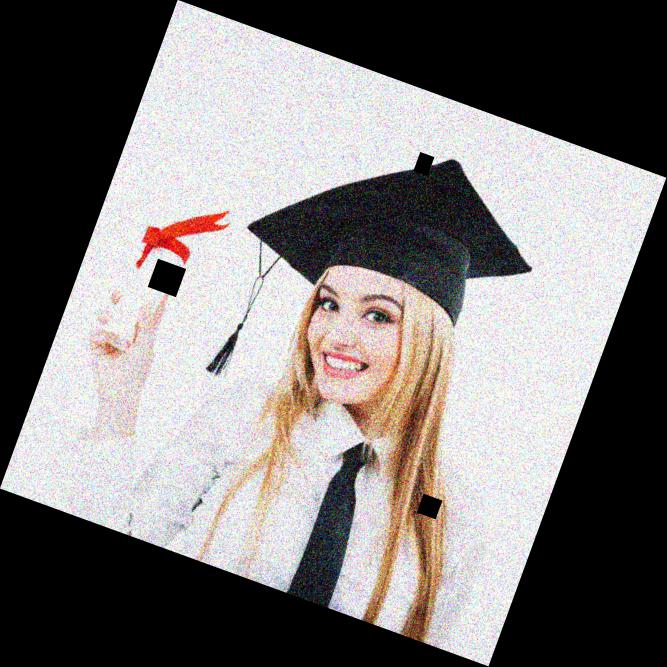
damaged_image.Anda akan memperbaiki masalah pada gambar ini dengan cara:
- Memutarnya agar tegak menggunakan
rotate() - Menerapkan reduksi derau dengan
denoise_tv_chambolle() - Merekonstruksi bagian yang rusak dengan
inpaint_biharmonic()dari modulinpaint.
show_image() sudah dimuat sebelumnya.
Latihan ini merupakan bagian dari kursus
Pemrosesan Citra dengan Python
Instruksi latihan
- Impor modul yang diperlukan untuk menerapkan pemulihan pada gambar.
- Putar gambar dengan memanggil fungsi
rotate(). - Gunakan algoritme chambolle untuk menghilangkan derau dari gambar.
- Dengan masker yang disediakan, gunakan metode biharmonic untuk memulihkan bagian gambar yang hilang dan memperoleh gambar akhir.
Latihan interaktif langsung praktik
Cobalah latihan ini dengan melengkapi kode contoh ini.
# Import the necessary modules
from skimage.restoration import denoise_tv_chambolle, ____
from skimage import transform

# Transform the image so it's not rotated
upright_img = ____(damaged_image, 20)

# Remove noise from the image, using the chambolle method
upright_img_without_noise = ____(upright_img,weight=0.1, multichannel=True)

# Reconstruct the image missing parts
mask = get_mask(upright_img)
result = ____.____(upright_img_without_noise, mask, multichannel=True)

show_image(result)