Buat sebuah mask
Mask adalah metode utama untuk menghilangkan atau memilih bagian tertentu dari sebuah citra. Mask berupa larik biner yang menunjukkan apakah suatu nilai harus disertakan dalam analisis. Biasanya, mask dibuat dengan menerapkan satu atau lebih operasi logika pada citra.
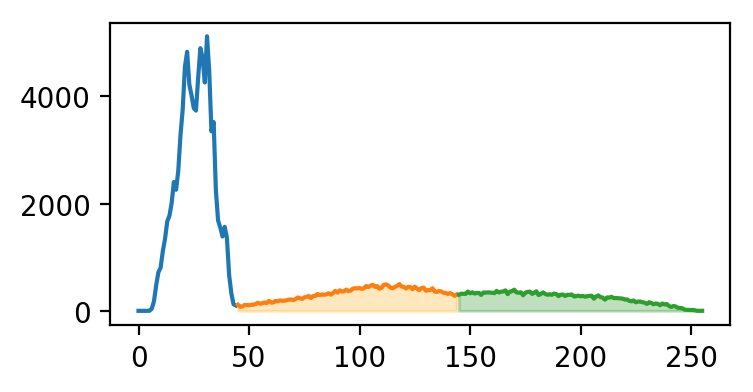
Untuk latihan ini, cobalah menggunakan ambang intensitas sederhana untuk membedakan antara kulit dan tulang pada radiograf tangan. (im telah diekualisasi agar menggunakan seluruh rentang intensitas.)
Di bawah ini adalah histogram im yang diwarnai berdasarkan segmen yang akan kita plot.
Latihan ini merupakan bagian dari kursus
Analisis Citra Biomedis dengan Python
Instruksi latihan
- Buat mask tulang dengan memilih piksel berintensitas lebih besar atau sama dengan
145. - Buat mask kulit dengan memilih piksel berintensitas lebih besar atau sama dengan
45dan kurang dari145. - Plot mask kulit dan tulang dalam skala abu-abu.
Latihan interaktif langsung praktik
Cobalah latihan ini dengan melengkapi kode contoh ini.
# Create skin and bone masks
mask_bone = ____
mask_skin = ____

# Plot the skin (0) and bone (1) masks
fig, axes = plt.subplots(1,2)
axes[0].imshow(____)
axes[1].imshow(____)
format_and_render_plot()