डेटा को constants के रूप में परिभाषित करना
इस पूरे कोर्स में, हम tensorflow संस्करण 2.6.0 का उपयोग करेंगे और हर अभ्यास के लिए केवल ज़रूरी submodules ही इम्पोर्ट करेंगे। आम तौर पर यह आपके लिए पहले से किया होगा, लेकिन इस अभ्यास में आप खुद tensorflow से constant इम्पोर्ट करेंगे.
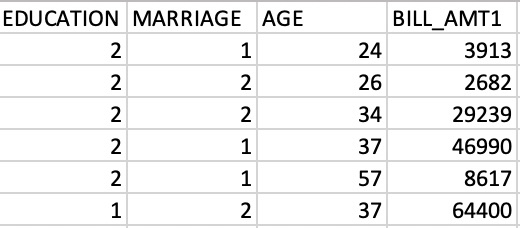
constant इम्पोर्ट करने के बाद, आप इसका उपयोग करके numpy array credit_numpy को tensorflow constant credit_constant में रूपांतरित करेंगे। इस array में क्रेडिट कार्ड धारकों के एक डेटासेट से फीचर कॉलम शामिल हैं और इसकी झलक नीचे की इमेज में दी गई है। हम अगले चैप्टर्स में फिर इसी डेटासेट पर लौटेंगे.
ध्यान दें कि tensorflow 2 में आप डेटा को या तो numpy array के रूप में, या tensorflow के constant ऑब्जेक्ट के रूप में इस्तेमाल कर सकते हैं। constant का उपयोग करने से यह सुनिश्चित होता है कि उस ऑब्जेक्ट पर की जाने वाली सभी operations tensorflow में ही चलें.
यह अभ्यास पाठ्यक्रम का हिस्सा है
Python में TensorFlow परिचय
अभ्यास निर्देश
tensorflowमॉड्यूल सेconstantsubmodule इम्पोर्ट करें.credit_numpyarray कोtensorflowमेंconstantऑब्जेक्ट में बदलें। data type सेट न करें.
इंटरैक्टिव व्यावहारिक अभ्यास
इस अभ्यास को इस नमूना कोड को पूरा करके आज़माएँ।
# Import constant from TensorFlow
from tensorflow import ____

# Convert the credit_numpy array into a tensorflow constant
credit_constant = constant(____)

# Print constant datatype
print('\n The datatype is:', credit_constant.dtype)

# Print constant shape
print('\n The shape is:', credit_constant.shape)