Modeli Verinin Üzerine Çizmek
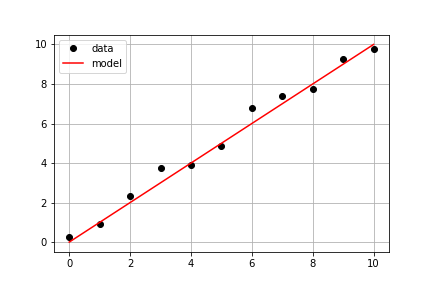
Önceki egzersizdeki aynı ölçüm verileriyle devam ederek, önceden tanımlı model() fonksiyonunu ve ölçülen times ile measured_distances verilerini kullanarak modellenmiş mesafeleri hesaplaman ve ardından hem ölçülen hem de modellenen verileri aynı eksen üzerinde çizmen gerekiyor.
Bu egzersiz, kursun bir parçasıdır
Python ile Doğrusal Modellemenin Temelleri
Egzersiz talimatları
- Modellenmiş değerleri hesaplamak için
model_distances = model(times, measured_distances)kullan. - Şekil ve eksen nesneleri oluşturmak için
plt.subplots()kullan. axis.plot()iletimesvemeasured_distancesdeğerlerinilinestyle=" ", marker="o", color="black"seçenekleriyle çiz.axis.plot()ile ayrıcatimesvemodel_distancesdeğerlerinilinestyle="-", color="red"seçenekleriyle çiz.
Uygulamalı etkileşimli egzersiz
Bu egzersizi bu örnek kodu tamamlayarak deneyin.
# Pass times and measured distances into model
model_distances = model(____, ____)

# Create figure and axis objects and call axis.plot() twice to plot data and model distances versus times
fig, axis = plt.subplots()
axis.plot(____, ____, linestyle="____", marker="____", color="____", label="Measured")
axis.plot(____, ____, linestyle="____", marker=None, color="____", label="Modeled")

# Add grid lines and a legend to your plot, and then show to display
axis.grid(True)
axis.legend(loc="best")
plt.show()