提取边的类型
在本练习中,您将把客户数据框中的客户 ID 与客户边列表进行匹配,判断每条边是 churn、non-churn,还是混合边。
使用函数 match(),为边列表新增两列。
fromLabel:from列对应节点的 churn 状态toLabel:to列对应节点的 churn 状态
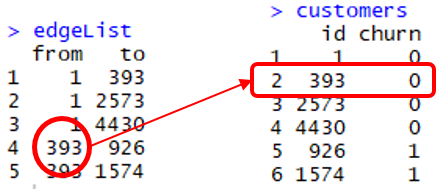
命令 match(x, y) 会返回一个向量,给出 x 在 y 中的位置。在上图中,match(edgeList$from, customers$id) 的结果是 1,1,1,2,2。例如,edgeList$from 的第 4 行(ID 为 393 的客户)是 customers$id 的第 2 个元素。
因此,该客户的 churn 标签是 customers[2,2],即 0。
类似地,edgeList$from 中所有客户的 churn 标签为 customers[match(edgeList$from, customers$id),2]。
本练习是课程的一部分
使用 R 进行网络数据的预测分析
练习说明
- 向
edgeList数据框新增名为FromLabel的列:通过将edgeList$from与customers$id匹配,并提取customers$churn获得from节点的标签。 - 对
to边执行相同操作,新增列命名为ToLabel。 - 向
edgeList数据框新增名为edgeType的列,其值为FromLabel与ToLabel两列之和。 - 使用
table()函数查看各类型边的数量。
交互式实操练习
通过完成这段示例代码来试试这个练习。
# Add the column edgeList$FromLabel
edgeList$FromLabel <- customers[match(edgeList$___, customers$___), 2]

# Add the column edgeList$ToLabel
edgeList$ToLabel <- customers[___(___, ___), 2]

# Add the column edgeList$edgeType
edgeList$edgeType <- edgeList$___ + edgeList$___

# Count the number of each type of edge
___(edgeList$edgeType)