Logoları kaldırma
Videoda gördüğümüz gibi, görüntü restorasyonunun bir diğer kullanım alanı da bir sahneden nesneleri kaldırmaktır. Bu egzersizde bir görüntüden Datacamp logosunu kaldıracağız.
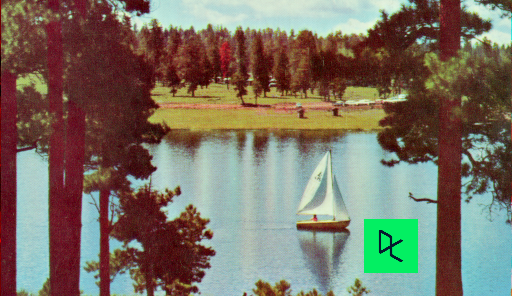
image_with_logo olarak yüklenmiş görüntü.
Bu alanı doldurarak (inpainting) logoyu silebilmek için maskeyi oluşturup ayarlayacaksın.
Unutma: Bir görüntüden bir nesneyi kaldırmak istediğinde, ya o nesneyi elle sınırlandırabilir ya da bulmak için bir görüntü analizi algoritması çalıştırabilirsin.
Bu egzersiz, kursun bir parçasıdır
Python ile Görüntü İşleme
Egzersiz talimatları
np.zeros()kullanarak, görüntüyle aynı şekle sahip bir maske başlat.- Maskede, doldurulacak bölgeyi 1 olarak ayarla.
maskkullanarakimage_with_logoüzerinde inpainting uygula.
Uygulamalı etkileşimli egzersiz
Bu egzersizi bu örnek kodu tamamlayarak deneyin.
# Initialize the mask
mask = ____(____[:-1])

# Set the pixels where the logo is to 1
mask[210:290, 360:425] = ____

# Apply inpainting to remove the logo
image_logo_removed = inpaint.____(____,
                                  ____,
                                  multichannel=True)

# Show the original and logo removed images
show_image(image_with_logo, 'Image with logo')
show_image(image_logo_removed, 'Image with logo removed')