Hareketli Yıllık Toplam
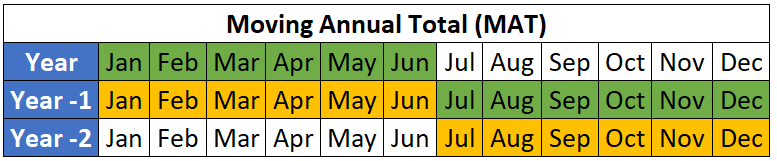
Önceki egzersizde YTD değerlerini hesapladın ama YTD'den daha uzun bir döneme de bakmak istiyorsun. Bu egzersizde tüm veri noktaları için Hareketli Yıllık Toplamı (MAT) hesaplayalım.
Hatırlatma: MAT, son 12 ayın toplamıdır.
Bu egzersizi DataCamp'te tarayıcı içi Excel ortamında ya da bilgisayarında Excel ve Copilot varsa yerel olarak tamamlayabilirsin.
İlerlemeni kaybettiysen, açık raporları kapat ve Workbooks klasöründen 1_4_moving_annual_total.xlsx dosyasını yükle.
Bu egzersiz, kursun bir parçasıdır
Vaka Çalışması: Excel'de Net Gelir Yönetimi
Uygulamalı etkileşimli egzersiz
Teoriyi etkileşime dönüştürün, interaktif egzersizlerimizden biriyle
 Egzersize başla