Contouren van vormen
In deze oefening gaan we de contour van een paard vinden.
Daarvoor gebruiken we een gebinariseerde afbeelding die scikit-image aanbiedt in de module data. Gebinariseerde afbeeldingen zijn makkelijker te verwerken bij het vinden van contouren met dit algoritme. Onthoud dat contourdetectie alleen 2D-beeldarrays ondersteunt.
Zodra de contour is gedetecteerd, tonen we die samen met de originele afbeelding. Zo kun je checken of onze analyse klopt!
show_image_contour(image, contours) is een vooraf ingeladen functie die de afbeelding met alle gevonden contouren toont met Matplotlib.
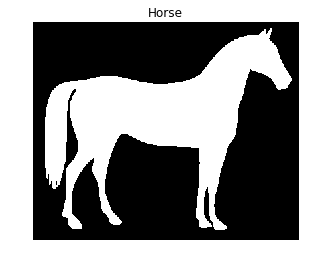
Onthoud dat je de functie find_contours() uit de module measure kunt gebruiken, door de gethresholdde afbeelding en een constante waarde door te geven.
Deze oefening maakt deel uit van de cursus
Beeldverwerking in Python
Oefeninstructies
- Importeer de data en de module die je nodig hebt voor contourdetectie.
- Haal de paardenafbeelding op die in de context wordt getoond.
- Vind de contouren van de paardenafbeelding met een constante levelwaarde van 0,8.
Interactieve oefening met praktijkervaring
Probeer deze oefening door deze voorbeeldcode aan te vullen.
# Import the modules
from skimage import ____, ____

# Obtain the horse image
horse_image = ____.horse()

# Find the contours with a constant level value of 0.8
contours = measure.____(____, ____)

# Shows the image with contours found
show_image_contour(horse_image, contours)