Moving Annual Total
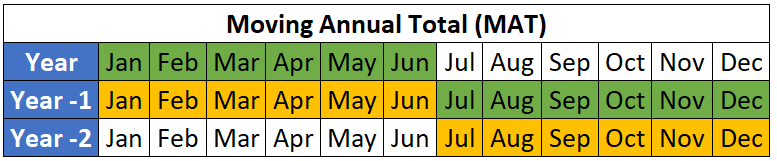
Je hebt in de vorige oefening de YTD-waarden berekend, maar je wilt ook naar een langere periode kijken dan YTD. Laten we in deze oefening de Moving Annual Total (MAT) berekenen voor alle punten in de gegevensset.
Ter herinnering: MAT is de som van de laatste 12 maanden.
Je kunt deze oefening afronden in de Excel-omgeving in de browser op DataCamp of lokaal op je eigen computer als je Excel en Copilot hebt.
Als je voortgang kwijt bent, sluit dan eventuele open rapporten en laad 1_4_moving_annual_total.xlsx uit de map Workbooks.
Deze oefening maakt deel uit van de cursus
Casestudy: Net Revenue Management in Excel
Interactieve oefening met praktijkervaring
Zet theorie om in actie met een van onze interactieve oefeningen
 Begin oefening