날짜 형식 지정
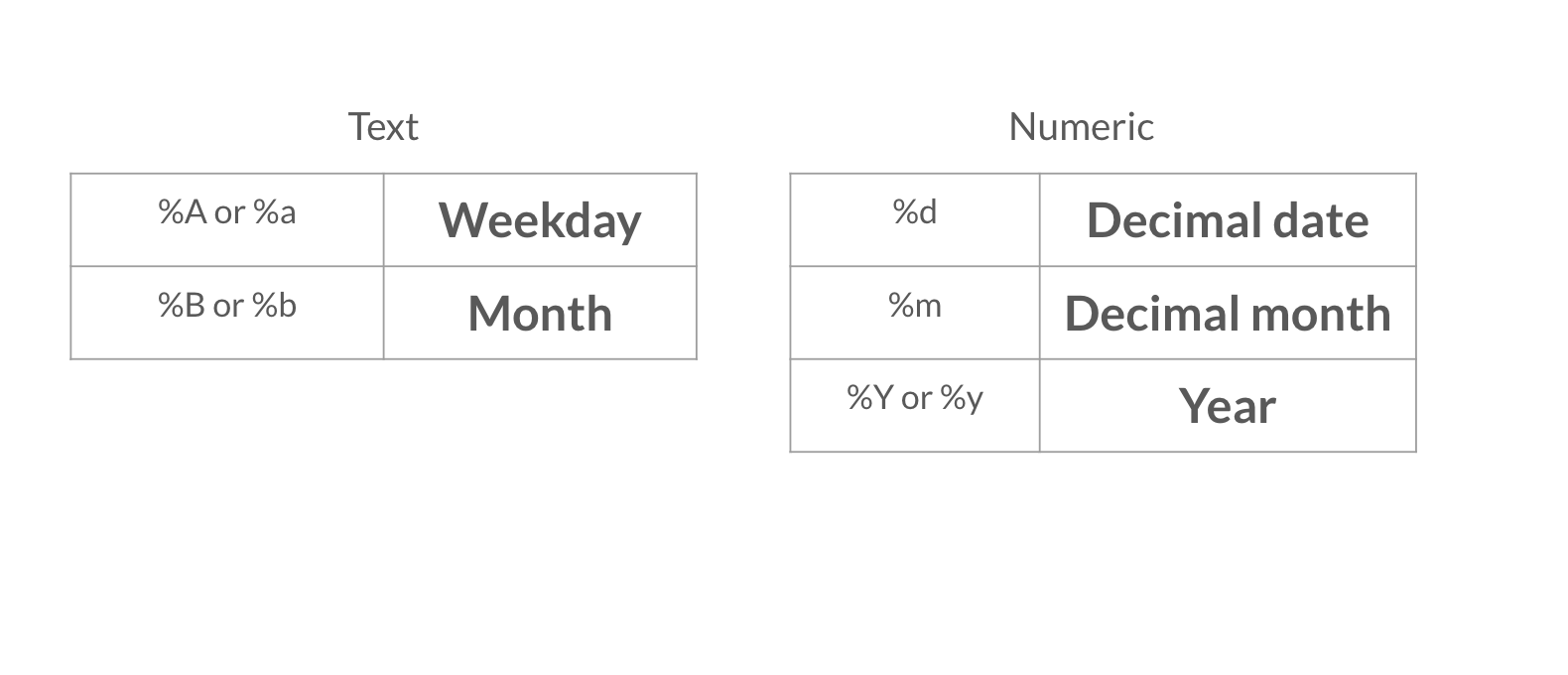
이제 보고서에 더 높은 수준의 정보가 포함되었으니, 날짜도 다른 형식으로 넣고 싶어요. 아래 영상에 나온 날짜 형식 옵션 표를 꼭 참고하세요.
이 연습은 강의의 일부입니다
R Markdown으로 보고서 만들기
연습 안내
- YAML 헤더에서
Sys.time()함수를 사용해 날짜를 수정하고, 날짜가 십진수 일, 달의 전체 이름, 네 자리 연도로 표시되도록 하세요. 예: 08 April 2020.
실습형 인터랙티브 연습
이 예제를 이 샘플 코드를 완성하여 풀어보세요.
{"investment_report.Rmd":"---\ntitle: \"Investment Report\"\nauthor: \"Add your name\"\ndate: \"`r format(___, '___')`\"\noutput: html_document\n---\n\n```{r data, include = FALSE}\nlibrary(readr)\n\ninvestment_annual_summary <- read_csv(\"https://assets.datacamp.com/production/repositories/5756/datasets/d0251f26117bbcf0ea96ac276555b9003f4f7372/investment_annual_summary.csv\")\ninvestment_services_projects <- read_csv(\"https://assets.datacamp.com/production/repositories/5756/datasets/78b002735b6f620df7f2767e63b76aaca317bf8d/investment_services_projects.csv\")\n```\n\n\n## Datasets \n\n### Investment Annual Summary\n\nThe `investment_annual_summary` dataset provides a summary of the dollars in millions provided to each region for each fiscal year, from 2012 to 2018.\n```{r}\ninvestment_annual_summary\n```\n\n### Investment Services Projects\n\nThe `investment_services_projects` dataset provides information about each investment project from the 2012 to 2018 fiscal years. Information listed includes the project name, company name, sector, project status, and investment amounts.\n```{r}\ninvestment_services_projects \n```\n\n\n"}