建立基礎報表
現在,請為下列視覺化建立基礎報表:
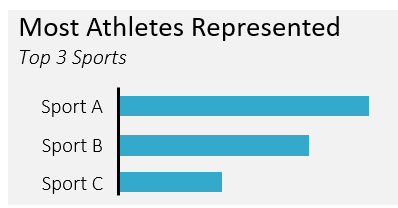
這份報表應透過查詢右下方資源總管中的 summer_games 資料表來建立。
本練習屬於課程
SQL 報表製作
練習說明
- 使用右側主控台,從
summer_games資料表選取sport欄位。 - 建立
athletes欄位,方法是計算athlete_id的不重複出現次數。 - 依
sport欄位分組。 - 讓報表只顯示 3 列,且
athletes最高者排在最上面。
動手互動練習
試著完成這個範例程式碼,體驗一下這個練習。
-- Query the sport and distinct number of athletes
SELECT
	____,
    ____ AS athletes
FROM summer_games
GROUP BY ____
-- Only include the 3 sports with the most athletes
ORDER BY ____
LIMIT ____;