在 Spark UI 中檢視快取
有一個 dataframe partitioned_df 可供使用。它被用來註冊一個名為 text 的暫存資料表。接著使用 spark.catalog.cacheTable('text') 將 text 快取起來。若你在本機執行 Spark,則可以在 http://localhost:4040/storage/ 看到 Spark UI。本題請你觀察下圖。圖片顯示的是在 text 的快取載入後,Spark UI 會出現的畫面:
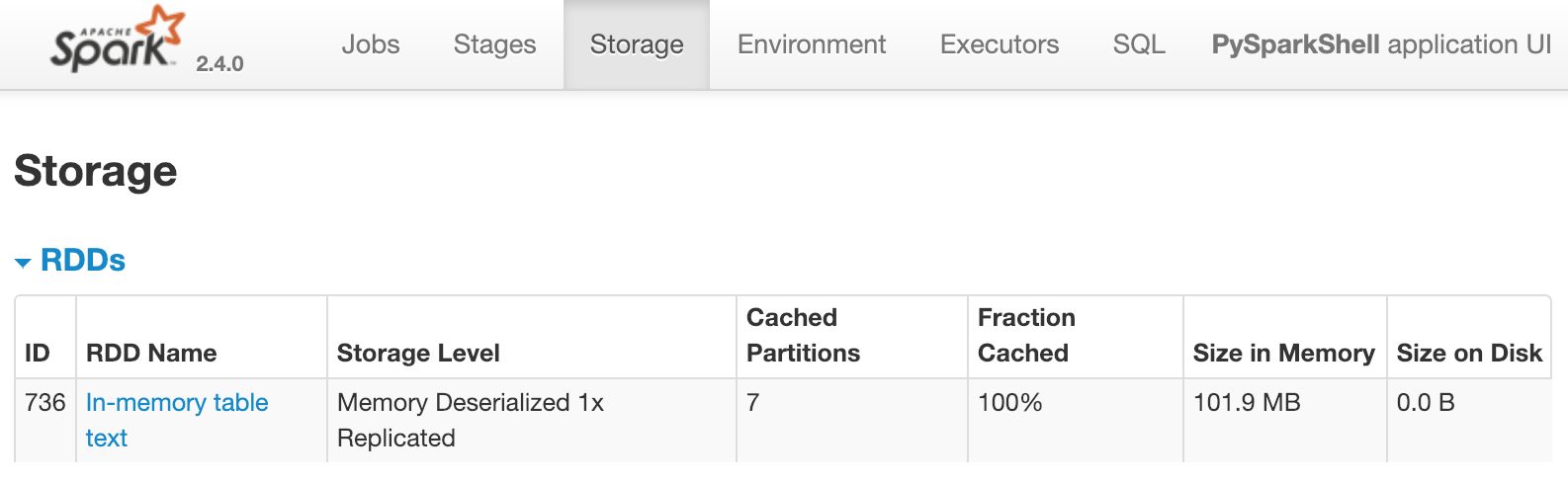
圖中顯示名為 text 的資料表已被快取到記憶體中,且有 7 個 partition。以下哪些操作會立即讓上述畫面出現在 Spark UI 中?
對底層 dataframe 做轉換,例如:
df = partitioned_df.distinct()。對底層 dataframe 做計數,例如:
partitioned_df.count()查詢該資料表,例如:
spark.sql("select count(*) from text")查詢並顯示結果,例如:
spark.sql("select count(*) from text").show()
本練習屬於課程
