資料庫綱要
到現在為止,你已經知道 SQL 資料庫一定會有資料庫綱要。在資料庫的影片中,你看過下列圖表:
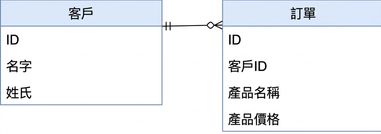
你的本機環境已設定一個 PostgreSQL 資料庫,包含這個資料庫綱要,並填入了一些範例資料。你可以使用 pandas 的 read_sql() 函式來查詢資料庫。你需要傳入一個資料庫引擎,這個引擎已為你定義為 db_engine。
pandas 套件以 pd 匯入後,會把查詢結果存成一個 DataFrame 物件,因此從資料庫取回結果後,你就可以對它使用任何 DataFrame 的功能。
本練習屬於課程
Data Engineering 入門
練習說明
- 完成
SELECT敘述,從"Customer"資料表選取first_name與last_name。請先依 lastname,再依 firstname 排序。 - 使用
.head()方法顯示data的前3列。 - 使用
.info()顯示data的一般資訊。
動手互動練習
試著完成這個範例程式碼,體驗一下這個練習。
# Complete the SELECT statement
data = pd.read_sql("""
SELECT first_name, ____ FROM "____"
ORDER BY ____, ____
""", db_engine)

# Show the first 3 rows of the DataFrame
print(data.head(____))

# Show the info of the DataFrame
print(data.____())