Tarihi biçimlendirme
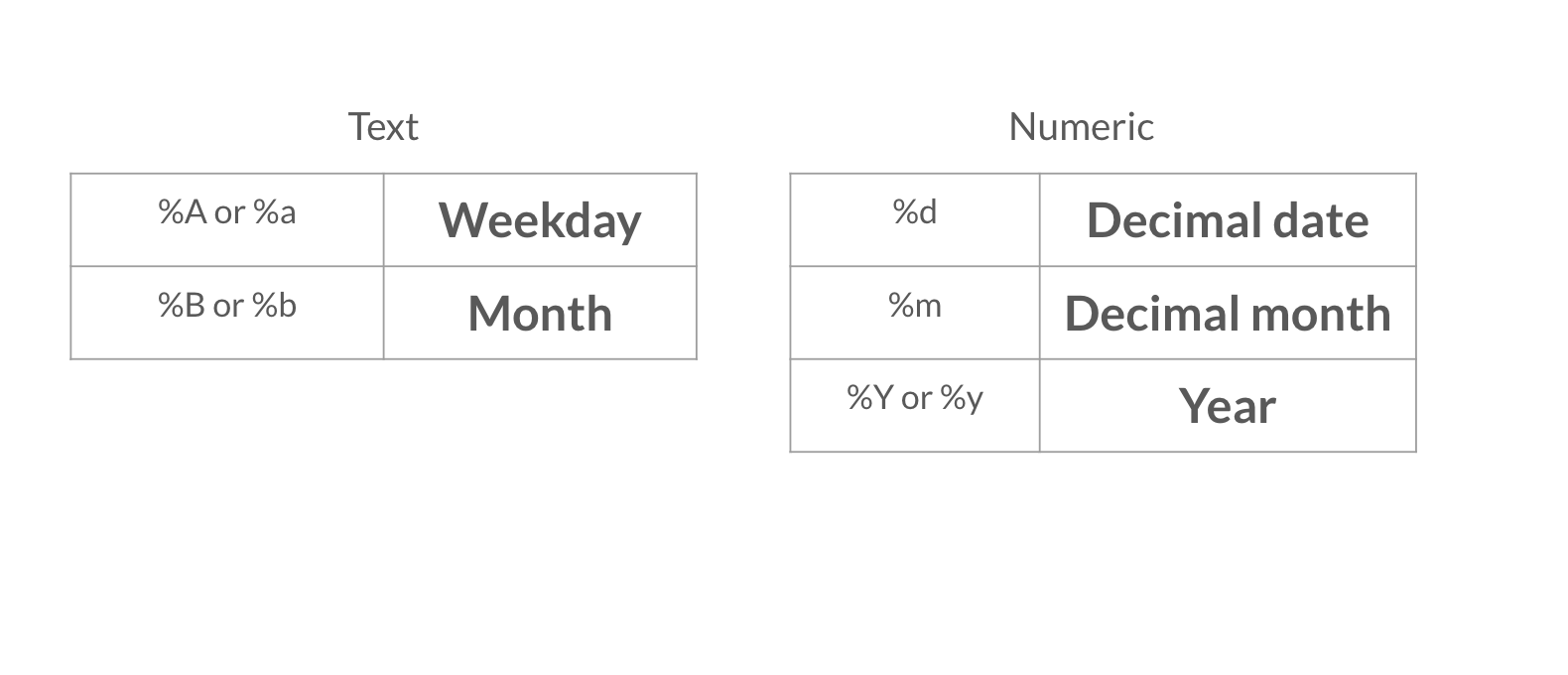
Raporuna daha üst düzey bazı detaylar eklediğine göre, şimdi tarihi farklı bir formatta eklemek istiyorsun. Aşağıdaki videodaki tarih biçimlendirme seçenekleri tablolarına mutlaka göz at.
Bu egzersiz, kursun bir parçasıdır
R Markdown ile Raporlama
Egzersiz talimatları
- YAML başlığındaki tarihi
Sys.time()fonksiyonunu kullanarak değiştir; tarih ondalık gün, ayın tam adı ve dört basamaklı yıl şeklinde görünsün. Örneğin: 08 April 2020.
Uygulamalı etkileşimli egzersiz
Bu egzersizi bu örnek kodu tamamlayarak deneyin.
{"investment_report.Rmd":"---\ntitle: \"Investment Report\"\nauthor: \"Add your name\"\ndate: \"`r format(___, '___')`\"\noutput: html_document\n---\n\n```{r data, include = FALSE}\nlibrary(readr)\n\ninvestment_annual_summary <- read_csv(\"https://assets.datacamp.com/production/repositories/5756/datasets/d0251f26117bbcf0ea96ac276555b9003f4f7372/investment_annual_summary.csv\")\ninvestment_services_projects <- read_csv(\"https://assets.datacamp.com/production/repositories/5756/datasets/78b002735b6f620df7f2767e63b76aaca317bf8d/investment_services_projects.csv\")\n```\n\n\n## Datasets \n\n### Investment Annual Summary\n\nThe `investment_annual_summary` dataset provides a summary of the dollars in millions provided to each region for each fiscal year, from 2012 to 2018.\n```{r}\ninvestment_annual_summary\n```\n\n### Investment Services Projects\n\nThe `investment_services_projects` dataset provides information about each investment project from the 2012 to 2018 fiscal years. Information listed includes the project name, company name, sector, project status, and investment amounts.\n```{r}\ninvestment_services_projects \n```\n\n\n"}