Oyuncuları seçmek için outer join kullanma
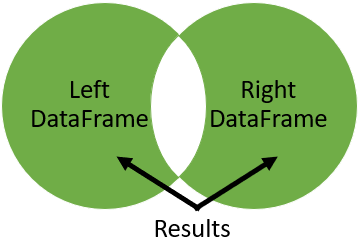
Outer join kullanmanın güzel yanlarından biri, iki birleştirilen tablodaki tüm satırları döndürdüğü ve eşleşmeyen yerleri null ile doldurduğu için, diğer tabloda eşleşmesi olmayan satırları bulmakta kullanılabilmesidir. Bunu kendin denemen için, iki popüler filmin oyuncu listelerini içeren iki tablo verildi: Iron Man 1 ve Iron Man 2. Oyuncuların çoğu her iki filmde de oynadı. Her iki filmde de oynamayan oyuncuları bulmak için bir outer join kullan.
Iron Man 1 tablosunun adı iron_1_actors, Iron Man 2 tablosunun adı iron_2_actors. Her iki tablo da senin için yüklendi ve yapıyı görebilmen için birkaç satır yazdırıldı.
Bu egzersiz, kursun bir parçasıdır
pandas ile Verileri Birleştirme
Egzersiz talimatları
iron_1_actors(sol) ileiron_2_actorstablolarınıidsütunu üzerinden outer join ile birleştirip sonekleri('_1','_2')olacak şekilde ayarlayarak sonucuiron_1_and_2içine kaydet.name_1veyaname_2null iseTrue, değilseFalsedöndüren bir indeks oluştur.
Uygulamalı etkileşimli egzersiz
Bu egzersizi bu örnek kodu tamamlayarak deneyin.
# Merge iron_1_actors to iron_2_actors on id with outer join using suffixes
iron_1_and_2 = iron_1_actors.merge(____,
                                     ____,
                                     ____,
                                     suffixes=____)

# Create an index that returns true if name_1 or name_2 are null
m = ((iron_1_and_2['name_1'].____) |
     (iron_1_and_2['____'].____))

# Print the first few rows of iron_1_and_2
print(iron_1_and_2[m].head())