Object detection
इस अभ्यास में, आप पहले वाले ही flickr डेटासेट का उपयोग करेंगे, जिसमें 30,000 इमेज और उनसे जुड़ी captions हैं. अब आप मॉडल द्वारा डिटेक्ट किए गए objects के bounding boxes ढूँढेंगे.
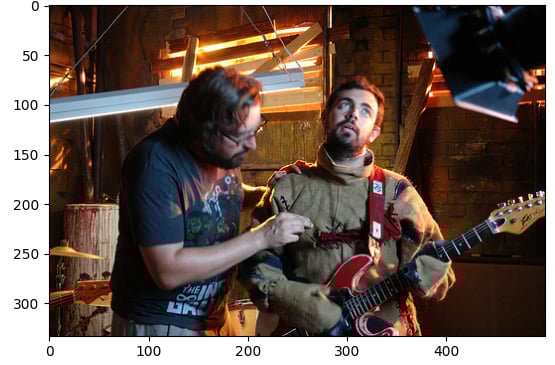
सैंपल इमेज (image) और पाइपलाइन मॉड्यूल (pipeline) लोड किए जा चुके हैं.
यह अभ्यास पाठ्यक्रम का हिस्सा है
Hugging Face के साथ मल्टी-मोडल मॉडल्स
अभ्यास निर्देश
facebook/detr-resnet-50pretrained मॉडल के साथobject-detectionपाइपलाइन लोड करें.- डिटेक्ट किए गए object का
labelनिकालें. - डिटेक्ट किए गए object का संबंधित confidence
scoreनिकालें. - डिटेक्ट किए गए object के bounding
boxके coordinates निकालें.
इंटरैक्टिव व्यावहारिक अभ्यास
इस अभ्यास को इस नमूना कोड को पूरा करके आज़माएँ।
# Load the object-detection pipeline
pipe = pipeline("____", "____", revision="no_timm")
pred = pipe(image)
outputs = pipe(image)

for n, obj in enumerate(outputs):
    # Find the detected label
    label = ____
    # Find the confidence score of the prediction
    confidence = ____
    # Obtain the bounding box coordinates
    box = ____

    plot_args = {"linewidth": 1, "edgecolor": colors[n], "facecolor": 'none'}
    rect = patches.Rectangle((box['xmin'], box['ymin']), box['xmax']-box['xmin'], box['ymax']-box['ymin'], **plot_args)
    ax.add_patch(rect)
    print(f"Detected {label} with confidence {confidence:.2f} at ({box['xmin']}, {box['ymin']}) to ({box['xmax']}, {box['ymax']})")

plt.show()