इमेज प्रीप्रोसेसिंग
इस अभ्यास में, आप flickr डेटासेट का उपयोग करेंगे, जिसमें 30,000 इमेज और उनसे जुड़ी कैप्शन हैं, ताकि इमेज पर प्रीप्रोसेसिंग ऑपरेशंस किए जा सकें. यह प्रीप्रोसेसिंग इसलिए ज़रूरी है ताकि इमेज डेटा Hugging Face मॉडल टास्क्स के साथ इन्फरेंसिंग के लिए उपयुक्त बन सके, जैसे इमेज से टेक्स्ट जनरेशन. इस केस में, आप इस इमेज के लिए एक टेक्स्ट कैप्शन जनरेट करेंगे:
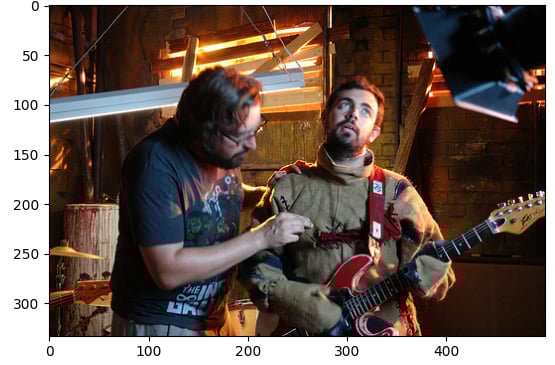
डेटासेट (dataset) निम्न संरचना के साथ लोड किया गया है:
Dataset({
    features: ['image', 'caption', 'sentids', 'split', 'img_id', 'filename'],
    num_rows: 10
})
इमेज-कैप्शनिंग मॉडल (model) लोड किया जा चुका है.
यह अभ्यास पाठ्यक्रम का हिस्सा है
Hugging Face के साथ मल्टी-मोडल मॉडल्स
अभ्यास निर्देश
- डेटासेट के इंडेक्स
5वाले एलिमेंट से इमेज लोड करें. - प्रीट्रेंड मॉडल
Salesforce/blip-image-captioning-baseका इमेज प्रोसेसर (BlipProcessor) लोड करें. imageपर प्रोसेसर चलाएँ और सुनिश्चित करें कि PyTorch टेन्सर्स (pt) की आवश्यकता बताई गई है..generate()मेथड का उपयोग करकेmodelसे कैप्शन जनरेट करें.
इंटरैक्टिव व्यावहारिक अभ्यास
इस अभ्यास को इस नमूना कोड को पूरा करके आज़माएँ।
# Load the image from index 5 of the dataset
image = dataset[5]["____"]

# Load the image processor of the pretrained model
processor = ____.____("Salesforce/blip-image-captioning-base")

# Preprocess the image
inputs = ____(images=____, return_tensors="pt")

# Generate a caption using the model
output = ____(**inputs)
print(f'Generated caption: {processor.decode(output[0])}')
print(f'Original caption: {dataset[5]["caption"][0]}')