在 Spark UI 中检查缓存
已有一个名为 partitioned_df 的 dataframe。它被用于注册一个名为 text 的临时表。随后通过 spark.catalog.cacheTable('text') 对 text 进行缓存。若在本地运行 Spark,Spark UI 可通过 http://localhost:4040/storage/ 访问。就本练习而言,请查看下面的图片。它展示了在 text 的缓存加载完成后,Spark UI 会显示的内容:
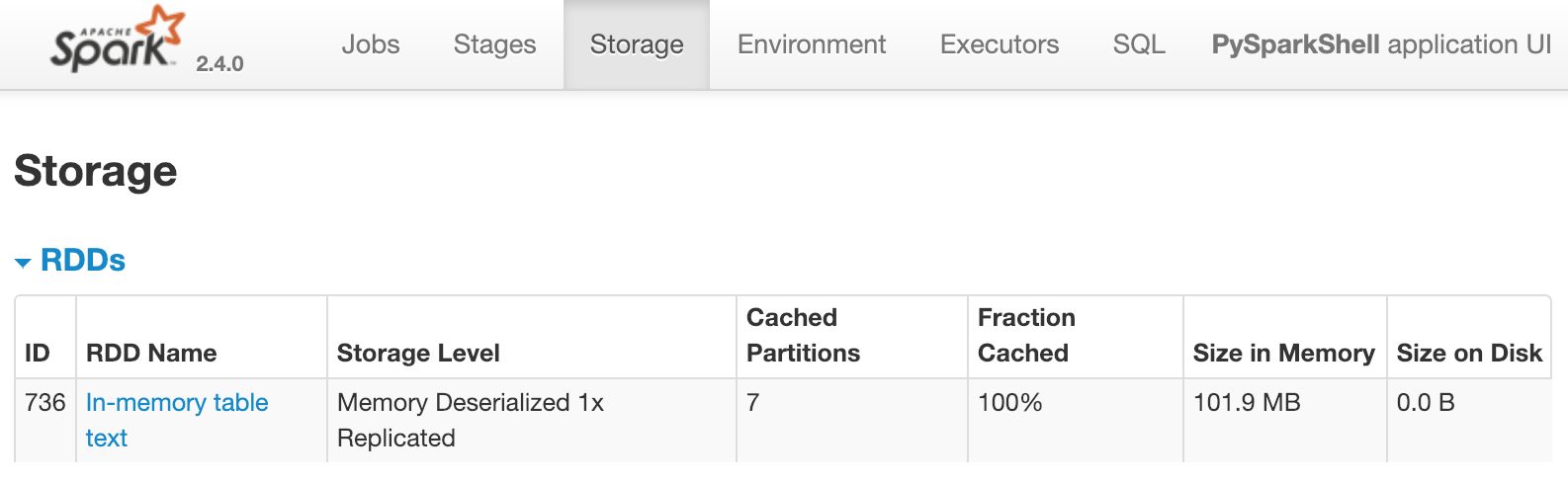
这表明名为 text、具有 7 个分区的表已缓存到内存中。以下哪一项会立即导致上述内容出现在 Spark UI 中?
对底层 dataframe 进行转换,例如:
df = partitioned_df.distinct()。对底层 dataframe 计数,例如:
partitioned_df.count()查询该表,例如:
spark.sql("select count(*) from text")查询并显示结果,例如:
spark.sql("select count(*) from text").show()
本练习是课程的一部分
