Üretim Optimizasyonu: Ara & Durdur
Hadi, önceki bir egzersizde oluşturulan duvar saati fabrikası modelini kullanalım ve kritik darboğaz süreçlerini belirlemek için Monte Carlo örneklemesine dayalı bir "Ara & Durdur" optimizasyon yaklaşımı kuralım.
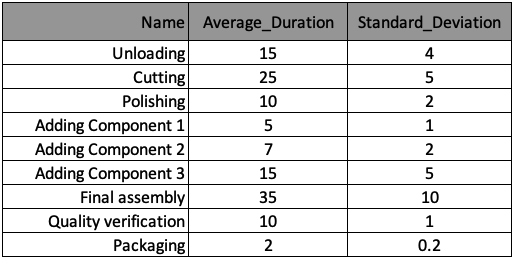
Üretim süreci aşağıdaki tabloda özetlenmiştir ve bilgiler, her süreç için bir sözlük olacak şekilde processes adlı sözlük listesinde saklanmıştır. Bu sözlükteki anahtarlar, tablonun sütun başlıklarına karşılık gelir.
Bu egzersizde grafikleri üretmek için kullanılacak plot_results() yöntemi önceden yüklendi ve aşağıda gösterilmiştir.
def plot_results():
    df_disc = pd.DataFrame({cNam[0]: process_line_space, cNam[1]: time_record})
    fig = sns.lineplot(data=df_disc, x=cNam[0], y=cNam[1], marker='o')
    plt.grid()
    fig.set(xlim=(0, len(processes)))
    fig.set(ylim=(0, 180))
    fig.set(xticks=process_line_space)
    plt.plot()
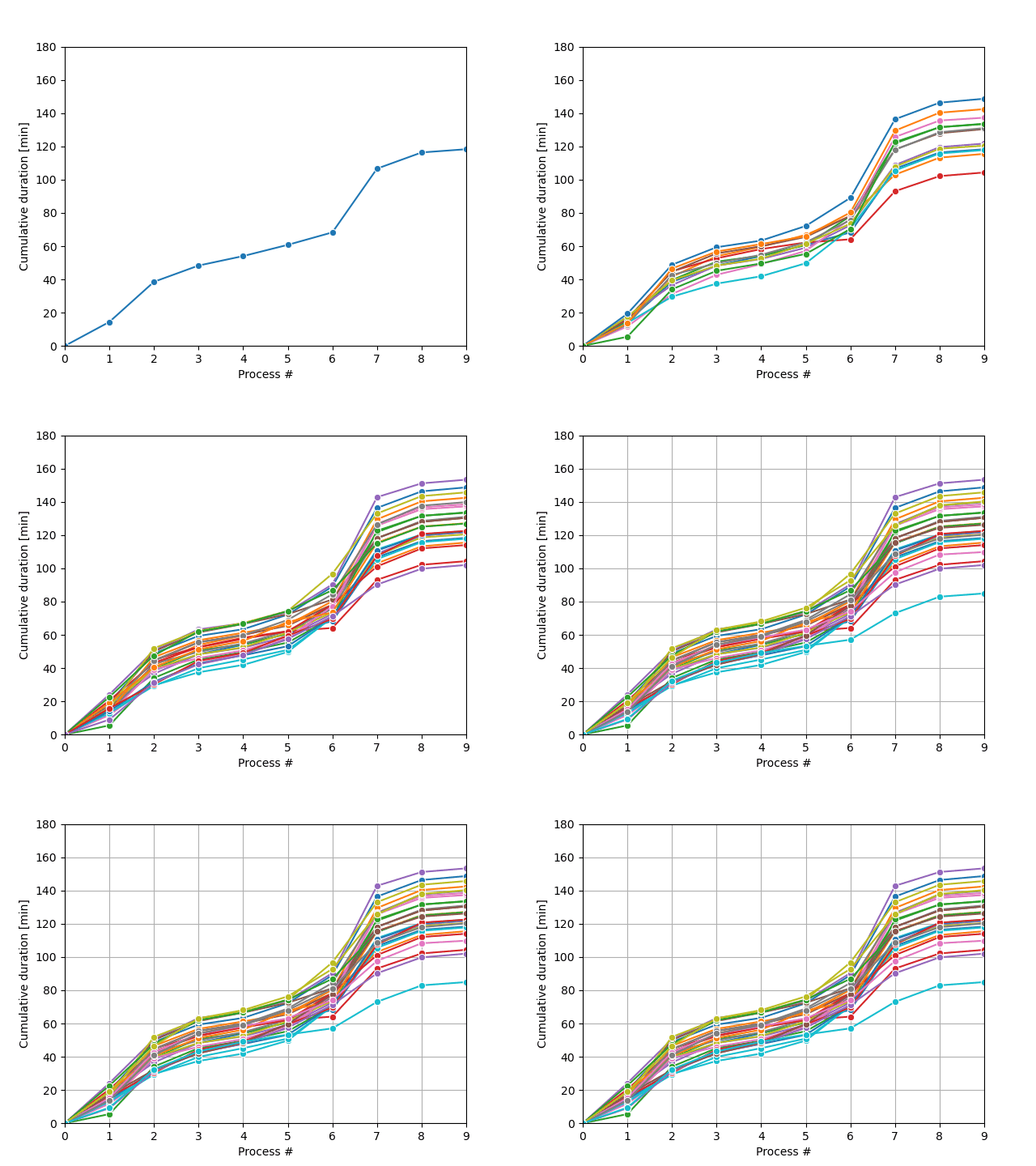
Monte Carlo örnekleme döngüsü, şekilde gösterildiği gibi olası süreç yörüngeleri üretecek ve istenen koşul sağlandığında duracaktır.
Bu egzersiz, kursun bir parçasıdır
Python ile Ayrık Olay Benzetimi
Egzersiz talimatları
run_isıfıra eşitken veyatotal_duration[run_i]85 saatten büyükken simülasyon yörüngelerini çalıştıracak bir döngü kur (yani, durdurma koşulu:total_duration[run_i]85 saate eşit veya 85 saatten küçük olduğunda).run_monte_carlo()fonksiyonunda saklanan Monte Carlo motorunu çalıştır.
Uygulamalı etkileşimli egzersiz
Bu egzersizi bu örnek kodu tamamlayarak deneyin.
def run_monte_carlo():
    run_i = 0

    # While-loop with the stop condition
    ____

        run_i += 1
        env = simpy.Environment()
        env.process(manufractoring_process(env))
        env.run()
        plot_results()
    plt.show()

# Call the run_monte_carlo function
____