Definire i dati come costanti
Per tutto il corso useremo tensorflow versione 2.6.0 e importeremo esclusivamente i sottomoduli necessari per completare ogni esercizio. Di solito questo passaggio sarà già fatto per te, ma in questo esercizio sarai tu a importare constant da tensorflow.
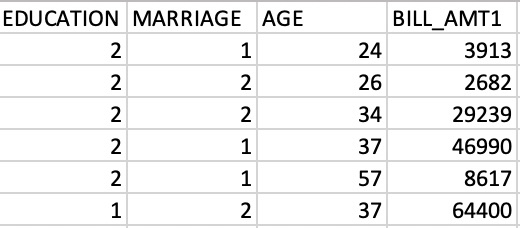
Dopo aver importato constant, lo userai per trasformare un array di numpy, credit_numpy, in una costante di tensorflow, credit_constant. Questo array contiene colonne di caratteristiche da un insieme di dati su titolari di carte di credito ed è mostrato in anteprima nell’immagine qui sotto. Torneremo su questo insieme di dati nei capitoli successivi.
Nota che tensorflow 2 ti permette di usare i dati sia come array di numpy sia come oggetto constant di tensorflow. Usare una constant garantisce che qualsiasi operazione eseguita con quell’oggetto venga effettuata in tensorflow.
Questo esercizio fa parte del corso
Introduzione a TensorFlow in Python
Istruzioni dell'esercizio
- Importa il sottomodulo
constantdal modulotensorflow. - Converti l’array
credit_numpyin un oggettoconstantintensorflow. Non impostare il tipo di dato.
esercizio interattivo pratico
Prova questo esercizio completando questo codice di esempio.
# Import constant from TensorFlow
from tensorflow import ____

# Convert the credit_numpy array into a tensorflow constant
credit_constant = constant(____)

# Print constant datatype
print('\n The datatype is:', credit_constant.dtype)

# Print constant shape
print('\n The shape is:', credit_constant.shape)