Contorni delle forme
In questo esercizio troveremo il contorno di un cavallo.
Per farlo useremo un'immagine binarizzata fornita da scikit-image nel suo modulo data. Le immagini binarizzate sono più semplici da elaborare quando si cercano i contorni con questo algoritmo. Ricorda che la ricerca dei contorni supporta solo array di immagini 2D.
Una volta rilevato il contorno, lo mostreremo insieme all'immagine originale. In questo modo potrai verificare se l'analisi è corretta!
show_image_contour(image, contours) è una funzione precaricata che visualizza l'immagine con tutti i contorni trovati usando Matplotlib.
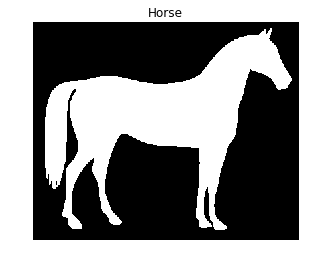
Ricorda che puoi usare la funzione find_contours() dal modulo measure, passando l'immagine sogliata e un valore costante.
Questo esercizio fa parte del corso
Elaborazione di immagini in Python
Istruzioni dell'esercizio
- Importa il modulo per i dati e quello necessario per il rilevamento dei contorni.
- Ottieni l'immagine del cavallo mostrata nell'area contestuale.
- Trova i contorni dell'immagine del cavallo usando un valore di livello costante pari a 0.8.
esercizio interattivo pratico
Prova questo esercizio completando questo codice di esempio.
# Import the modules
from skimage import ____, ____

# Obtain the horse image
horse_image = ____.horse()

# Find the contours with a constant level value of 0.8
contours = measure.____(____, ____)

# Shows the image with contours found
show_image_contour(horse_image, contours)