Inspecter le cache dans l’interface Spark UI
Un dataframe partitioned_df est disponible. Il sert à enregistrer une table temporaire appelée text. text est ensuite mise en cache avec spark.catalog.cacheTable('text'). Si vous exécutiez Spark en local, l’interface Spark UI serait disponible à l’adresse http://localhost:4040/storage/. Pour cet exercice, examinez l’image suivante. Elle montre ce que Spark UI afficherait une fois le cache de text chargé :
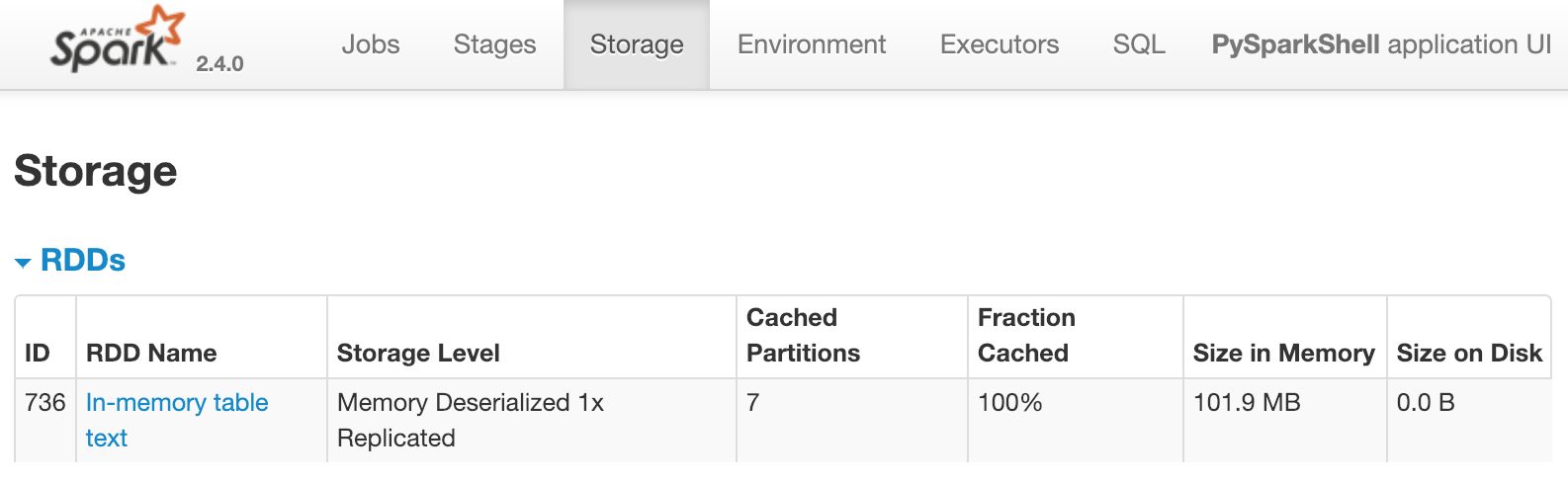
Cela montre qu’une table appelée text comportant sept partitions est mise en cache en mémoire. Laquelle des actions suivantes ferait apparaître immédiatement ce résultat dans Spark UI ?
Effectuer une transformation sur le dataframe sous-jacent, par exemple :
df = partitioned_df.distinct().Compter le dataframe sous-jacent, par exemple :
partitioned_df.count()Interroger la table, par exemple :
spark.sql("select count(*) from text")Interroger et afficher le résultat, par exemple :
spark.sql("select count(*) from text").show()
Cet exercice fait partie du cours
<cours>Introduction à Spark SQL en Python</cours>Exercice interactif pratique
Transformez la théorie en action avec l’un de nos exercices interactifs
 Commencer l’exercice